Try our cookiesAlza.cz a. s., Company identification number 27082440, uses cookies to ensure the functionality of the website and with your consent also to personalisage the content of our website. By clicking on the “I understand“ button, you agree to the use of cookies and the transfer of data regarding the behavior on the website for displaying targeted advertising on social networks and advertising networks on other websites.
We use 8 categories of cookies on our website:
Technical cookies
These are strictly necessary for the functioning of the website and the features you choose to use. Without them, our website would not work; you wouldn't be able to log in to your user account, for example.
Functionality cookies
These cookies allow us to remember your basic choices and improve the user experience. These include remembering your preferred language or allowing you to stay logged in permanently.
Social media cookies
These cookies allow us to easily link you to your social media profile and, for example, allow you to share products and services with your friends and family.
Content personalisation
These cookies allow us to show you content and ads according to the information we have about you to best meet your needs. This includes what content you have viewed, or on what device you are accessing our website.
Non-personalised advertising
These cookies allow us to show you general ads for products and services.
Personalised advertising
Thanks to these cookies, we and our partners can offer you relevant products and services based on your purchases, your shopping behaviour and your preferences.
Audience metrics
These cookies allow us to optimise our site for your convenience based on how you use it. The aim is to remember or anticipate your choices. This includes, for example, the use of features, their location, or the behaviour on the page.
Third party cookies
These are third party cookies, and you can find out more about them and our partners here.
By giving your consent to the processing of cookies, functionality and analytical cookies will be installed on the device you use to browse the website (click on the "I understand" button for both categories, or you can select only one of the categories by clicking on the "Settings" button). We always install technical cookies on your device, even without your explicit consent, because without them our website would simply not work.
You can revoke your consent to the processing of cookies. In connection with our company's cookie processing, you also have the following rights: the right to access cookies, delete, modify, supplement and correct them, restrict processing and the right to lodge a complaint with the Office for Personal Data Protection. Read more about your rights.
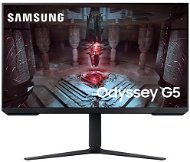
Interested in reviews of 32" Samsung Odyssey G51C? It got 4.5 out of 5 stars from our customers. Find specific customer reviews of 32" Samsung Odyssey G51C below. We will appreciate if you also share your experiences with 32" Samsung Odyssey G51C after purchasing.
I have a rtx 4060 so for me the resolution of 2k is rich enough for the size of 32 inches it's not bad of course 4k would be nicer but because of the workload of the graphics card I chose a 2k monitor and for the money it's a good panel probably a better middle and I got what I wanted who does not need 4k so feel free to recommend, you have to play around in the menu with the colors, brightness, everything to adjust and tweak! but then it looks nice.
Verified purchase - review from a price comparison website
Menu in Italian from the factory, English unavailable, quite difficult to find how to set English or German when I don't speak Italian. Good thing the default is not Korean.
Meets specifications
Good price-performance ratio
Quality monitor for professional (home office) work with text and graphics (I don't play games)
It's really a lot of music for quite a bit of money. I didn't want to pay 10k or more for a monitor, so I tried this one and I can't praise it enough. It's really a happy medium. For the average player, it really is enough. It has a great response and refresh rate. The picture is beautiful. Next time I would probably reach for a curved monitor, but for now it is sufficient. It can be positioned in any direction you can think of. Really the only drawback I found is the really big and awkward stand, specifically its "paws". I understand that it's for stability, but still, sticking forward enough for someone who has limited desk space is a minor drawback. Despite its size, it looks pretty cheap, but the monitor does not fall over, so the purpose, you can say, fulfills. For the money, I definitely recommend it.
Price/performance ratio
Great picture
Wide range of image settings directly in the monitor menu
Refresh rate
Monitor height and tilt adjustability
Larger stand (takes up a lot of space on a small table)
For relatively little money a lot of music, the only thing that bothers me personally are the lack of built-in speakers with at least some sound (but only my subjective view) and secondly is the cutout for the VESU 100x100. The cutout around the VESA is round and the installation area of the VESA is really only 100x100, so if you are considering a stand to have an installation plate only for VESA 100x100, those stands that have an installation plate for both VESA 100x100 and VESA 120x120, 140x140 etc., so you will not fit there (unless you do as I did and flex the installation plate of the stand)
Price
165Hz (perfectly adequate for the money)
FreeSync (for AMD GPU users)
consumption of 29 kWh/1000h is very good in terms of monitor size
I bought the monitor purely for gaming and light office work. The 32" diagonal is really big and if you have a place to put a monitor, I can only recommend it. Everything at this size draws you into the action. The refresh rate of 165 Hz is absolutely enough for most games. The color reproduction is also very nice, of course this is an " entry" level model, so it cannot be compared with panels with more advanced technologies such as OLED. Despite this, the colors are very nicely balanced and the coverage is really great for such an affordable monitor. In HDR mode, the situation is slightly worse, unfortunately again and here more noticeably, it cannot match the higher price category with OLED displays, but if we forget the higher price category, it offers a really beautiful HDR experience. I would recommend improving it by switching from HDR standard to HDR Dynamic in the monitor' s control panel. and also to calibrate using the Windows HDR calibration application (Win11). VRR, here Freesync Premium is in my opinion now a necessity, it really makes a big difference in the smoothness of the image. So far, I have not encountered any artifacts when using this technology with nVidia GPUs. In conclusion, we can only say that if you are looking for an affordable monitor for around 6000 CZK, I can only recommend this one.
165 Hz
32" (80 cm) diagonal
Color balance and reproduction
HDR mode is very good on a VA panel (after calibration)
Price
VRR works without a problem (with nVidia GPU you just need to turn it on in the control panel)
Verified purchase - review from a price comparison website
I was very surprised by the price of this product and the fact that it is a VA panel. Of course, it does not reach the quality of monitors over 20000 Kc, but I think that for less money I got a lot of music, which is common with Samsung (according to my experience). Definitely at this monitor size 2K is the minimum requirement. The optimum is 4K, but this requires a different machine within the gaming PC and thus our investment grows. P. S. Of course, when used with a console, the TV will always lead here (Mini-LED or OLED, the others just a waste for watching Voyo etc. ) in the price range above 20000 Kc, as it can provide better and greater support in terms of display or gaming experience. OLED monitors are so far in the framework of the current generation somewhere in between (besides they do not like the stationary image, the threat of "burn-in" effect) and the price is a bit out of the question, when for the money you buy a 65" TV in certain cases.
I recommend to check out the full review here on the site: https://www.rtings.com/monitor/reviews/samsung/odyssey-g5-g51c-s27cg51 (this is the tested 27" version, but it is technically identical to the 32" version).
The 32" size is really significant for both work and play, which gives certain positives and advantages for each of these two options. it also depends on what kind of work (for graphics or professional work it is not optimal).
It has quite nice colours, but HDR is weaker on "standard" level. It is better to use the "dynamic" level when HDR is enabled.
The black display is at a very good level with the possibility of adjustment in the settings. Compared to the IPS panel, which lags in this direction even with "local dimming" enabled.
Well designed interface for monitor setup in terms of orientation and access.
It can also convert and display 4K signal from PS5.
No major problem with "motion blur" and motion blur, although sometimes you can notice some disorder with faster movement in FPS gaming. it always depends on the source and settings.
Complete satisfaction in terms of stability and positionability, where you can actually position it in all directions.
Good text readability "text clarity" at 2K resolution relative to monitor size.
Unfortunately, VRR support only works for PC and Xbox with uricity settings. This means low cooperation with PS5, but it's not really important. I leave AMD FreeSync off, when playing on PS5 it is more recommended.
Weaker HDR and thus colour display compared to more expensive monitors (IPS or Mini-LED panel type). with OLED is absolutely not comparable.
When playing on a console, you can see some imperfections in the display of textures, etc., but it's more or less negligible in the price/performance ratio of this monitor. Of course, it is necessary to take into account the limitations of the console and its graphic display compared to a PC of a higher gaming class.
The maximum refresh rate of 165 Hz is achieved only when connecting a PC via a display-port cable. Otherwise via HDMI and console gaming only 120 -144 Hz. It is also due to the fact that the monitor only has two HDMI 2.0 ports.
Absence of "local dimming", which is not a negative given that the black display works fine without this tweak. this means that there are no big discrepancies in the framing or transition/motion between light and dark areas on the screen. at least I haven't noticed it on a large scale yet, because I'm short.
0 ×Report
Automatic translation
11 - 20 from 35
P-DC1-WEB15
Kunden vertrauen unsWir haben eine Bewertung von 4,7 von 5 Sternen auf TrustpilotMore info »