



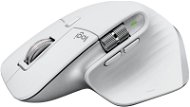
Reviews Logitech MX Master 3S For Mac Pale Grey
Interested in reviews of Logitech MX Master 3S For Mac Pale Grey? It got 4.5 out of 5 stars from our customers. Find specific customer reviews of Logitech MX Master 3S For Mac Pale Grey below. We will appreciate if you also share your experiences with Logitech MX Master 3S For Mac Pale Grey after purchasing.
User Reviews

Tomáš, Mariánské Hory - Ostrava
Rated 07/02/2024, variant Logitech MX Master 3S For Mac Pale Grey
Verified purchase - review from a price comparison website
Very quiet.
0 ×Report
Automatic translation

Zdeňka, Praha 9
Rated 03/12/2023, variant Logitech MX Master 3S For Mac Pale Grey
Verified purchase
It's an excellent and quiet mouse with lots of settings, but difficult to use for my smaller hands. After a while my hand hurt as I had to stretch my fingers a lot. Too bad they don't make the same model for women's smaller hands... then it would have no competition...
number of function buttons
silent clicks
charging via usb c
size (it is very big and not suitable for smaller hands)
the side small button has a tighter grip and requires a slightly stronger grip on the table direction, which is not very comfortable
0 ×Report
Automatic translation

Marcel, Praha 9
Rated 11/10/2023, variant Logitech MX Master 3S For Mac Pale Grey
Verified purchase
Even though it is a mouse specifically for mac, so with the mac does not work as ideally as I would have imagined from such an expensive mouse (it's not my first bad experience with logitech) and I tried it on an older macbook pro but also on the new air m2. I bought it mainly because of the feature switching between two devices (win + mac). It works surprisingly better on win than on mac. However, I got used to it after a while somehow. After a year I had to return it because the mouse stopped clicking properly (left button). When just pressing the left button, it makes a double or even a triple click, sometimes it doesn't click at all, so drag'n'drop and similar closures where it doesn't catch the corner selection etc. it's terribly annoying and slows down graphics work.
ergonomics and grip in the hand, but it is designed for larger hands.
endless fast scroll is great
switching between devices
functionality with mack is not ideal
0 ×Report
Automatic translation
Maxim, Prague
Rated 24/09/2023, variant Logitech MX Master 3S For Mac Pale Grey
Verified purchase
All
You have to get used to the form of the mouse, at the beginning it is quite bothering
0 ×Report
Automatic translation
Company
Rated 09/06/2023, variant Logitech MX Master 3S For Mac Pale Grey
Verified purchase
No mistake!
Perfect multifunctional control.
It will make a lot of work easier and faster.
Long battery life.
Nothing.
0 ×Report
Automatic translation
Company
Rated 31/05/2023, variant Logitech MX Master 3S For Mac Pale Grey
Verified purchase
Size
Good compatibility
Lots of buttons
0 ×Report
Automatic translation

KLIMA RAPID, spol. s r.o., Praha 4
Rated 03/11/2022, variant Logitech MX Master 3S For Mac Pale Grey
Verified purchase
Ergonomic mouse far better than the original Apple
Precision of movement
Programming buttons
Quiet
it needs to be cleaned regularly and we'll see how white it still is in a year, the previous model has faded quite a bit.
Slightly slower horizontal scroll wheel than I have on the other model, but I don't use it that often just in Excel for wide spreadsheets.
0 ×Report
Automatic translation
Josef, Ústí nad Labem
Rated 16/10/2022, variant Logitech MX Master 3S For Mac Pale Grey
Verified purchase
The mouse is a fabulous product, but if you have an M1 chip and are sensitive to cursor smoothness, you are better off reaching for the MX master 3s Univesal with USB receiver like I did. Now I am already satisfied: -) Beware external USB with "For mac" does not work and does not come with it.
Working with multimedia
Custom settings individually for each app for buttons, gestures and scrolls - incredibly streamlined compared to a regular mouse
BT is actually more tuned than a regular BT mouse. - faster response
Super intuitive app. It was made with love, you can see that.
The design is luxurious
The quiet buttons are cool and the feeling - like haptic
However, the Universal version with USB receiver is more suitable for the Apple M1. Better smoothness and cursor response.
MAC M1 - ajajaj still the same as previous models. Logitech probably hasn't noticed that there are new mac models with M1 and M2 chips on the market for a while and it still can't communicate properly with their HW.
MAC M1 - slightly jerky non-smooth cursor movement. I spent a week intensively searching for a solution. Without success like everyone else. Like, it's easy to get used to and most people don't even notice it, but it bothers me.
MAC M1 - mouse delay. It's better than the universal BT mouse, but it's still not quite the same. I think for a 3k+ mouse it should be perfect. Maybe they'll fine-tune it in time. I don't know how it runs on a MAC with Intel
The scroll is hard to get used to, but you get used to everything with time.
And last but not least is mouse initialization. I'm used to instant start on my mac with loading apps. But for the first minute the mouse behaves like a normal mouse with default settings and sensitivity. So I have to wait until "the lady" is fully operational.

0 ×Report
Automatic translation
