Try our cookies Alza.cz a. s., Company identification number 27082440, uses cookies to ensure the functionality of the website and with your consent also to personalisage the content of our website. By clicking on the “I understand“ button, you agree to the use of cookies and the transfer of data regarding the behavior on the website for displaying targeted advertising on social networks and advertising networks on other websites.
Alzak icon
Catalogue
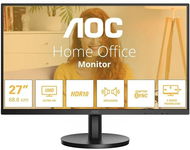
27" AOC U27B3A - Monitor

Reviews 27" AOC U27B3A

Interested in reviews of 27" AOC U27B3A? It got 4.2 out of 5 stars from our customers. Find specific customer reviews of 27" AOC U27B3A below. We will appreciate if you also share your experiences with 27" AOC U27B3A after purchasing.
198 €
In stock > 5 pcs
Add to Cart More Information

User Reviews

Adam, Brno 15flag
Rated 18/01/2026, variant 27" AOC U27B3A
Verified purchase
I think this panel is a great buy because it saves money in the right places - on the base and accessories. But you have to know what you want. If you don't need a USB hub, Power Delivery, pivot, height adjustment,. the panel itself is 4K IPS with a nice image, even the backlight is fine for me. I immediately mounted the panel on my VESA arm and have it as a second monitor to my 32" IPS 4K DELL, which cost maybe 4x as much. You can see that the panel is a little worse in image quality, but it's definitely not an order of magnitude difference for office use. It's just worth noting that 4K on 27" doesn't make much sense for work, because you need to set the zoom in the system anyway. It looks good, but it won't increase productivity that much. 4K videos from youtube look beautiful on it though, and that's why I bought it. I haven't tried the speaker or headphone output. But if it were to be the only monitor in the office, I'd rather buy a height-adjustable QHD (2,560×1,440 pixels) for the same price.
great price in the New Year promotion
IPS panel
thin frames
HDMI cable included
base totally without adjustment
more suitable for specific applications
0 ×Report
Automatic translation
Petr, Kolínflag
Rated 13/11/2025, variant 27" AOC U27B3A
Verified purchase
the monitor status LED is not very bright
quite light
matt display
horrible picture, uniform colour area, for example grey you can see in every place of the screen as differently bright - if you look perpendicularly to the centre, it is the brightest there, towards the edges it gets darker - moreover the right eye sees the picture differently than the left, which is quite unpleasant
you can only see the correct colours and brightness when you look at each pixel directly from the front (the optical axis goes perpendicular to the pixel surface), with a larger angular deviation the brightness drops quickly and the colours shift to blue to purple - calibration and measurement of backlight uniformity were probably carried out and measured only perpendicular to the surface (each pixel) - but if you intend to look at the monitor from 2,5 m or more distance, it looks good - it should be noted that my laptop with 15.4" TN display holds colors and brightness better, just like my 8 years old IPS BenQ monitors, although the white illumination has changed to slightly purple at the edges (but the image looks the same color and brightness from all angles)
the stated brightness of 350 NITS is probably only in some secret mode, the old monitor, which had only 300 NITS next to this literally shines - in the OSD there is an option "Picture Boost", which temporarily brightens the selected rectangular area - you can also select the whole picture - but this is not the solution
when switching to sRGB mode, the colour rendering is completely off
each monitor has different color component level values for the same preset chromatic profile, indicating that it is not the curves that are calibrated but the final settings for each profile, making it impossible to simply transfer user settings from one monitor to another to have the same color rendition
one of the two monitors has an image defect - a dark spot (not dirt on the surface) with a diameter of about 4 mm
false thin edges - the image on the sides and top starts up to 6 mm from the inner edge of the thin plastic frame
the OSD menu control is quite terrible, very often you accidentally turn off the monitor - the switch is physically the same button as the other ones for control, in addition, nicely in line with the others and even from below, so you can't see them
the plastic edges of the monitor are crooked - I bought two monitors and when you put them side by side they touch at the top and bottom, there is a 2 mm gap in the middle
the stand is so tiny that you need to support it with something at least 20 cm high, otherwise your cervical spine or between the shoulder blades will soon hurt
well, I could survive some of the negatives at this price (I replaced the stands with VESA arms), but I'll be returning this horror mainly because of the lousy picture quality
0 ×Report
Automatic translation
P-DC1-WEB20

Über 200-mal in Wien und Umgebung Genieße die 24/7-Abholung aus der AlzaBox. More info »