



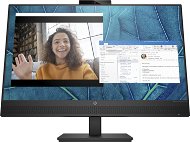
Reviews 27" HP M27m
Interested in reviews of 27" HP M27m? It got 4.0 out of 5 stars from our customers. Find specific customer reviews of 27" HP M27m below. We will appreciate if you also share your experiences with 27" HP M27m after purchasing.
User Reviews

Radim, KOPŘIVNICE
Rated 08/03/2025, variant 27" HP M27m
Verified purchase
I chose this monitor on the eShop because its technical specifications met all my requirements. After plugging it in, I was completely blown away by the picture quality and sound quality from its speakers. Incomparably better sound quality compared to all the ones I've heard so far. Just great. But in the end I decided to return it for four reasons: 1) it was unacceptably difficult for me to control the monitor inaccurately using the rear buttons, when I was constantly turning off the monitor by mistake and its rebooting after this shutdown takes a very long time for my taste; 2) Unfortunately, the monitor has a USB HUB with only 2 USB-A ports and I need it to have at least 3 USB ports; 3) incorrect placement of the headphone jack on the back too close to the back cover of the monitor, which makes it impossible to simply plug in the standard connector of most headphones and 4) I found out that for a 27" monitor the image resolution of 1920x1080 is too insufficient - but it would be suitable for example. people whose eyesight is no longer serving them well, typically seniors. For the connoisseurs, I'll add the info that this monitor doesn't have a PIVOT option, but I think 99% of people will never use this feature anyway (like me).
Very nice design
The speakers built towards the user produce the best (most natural) sound of any monitor I've had the opportunity to test
2x2W speaker power corresponds in real terms to the 2x5W speaker power of other monitors
Integrated 5MPix camera with internal sliding privacy cover including dual microphone with ambient noise cancellation and speaker feedback reduction
It offers all modern interfaces for cable connection, i.e. USB-C, DP and HDMI, plus two USB-A 3.0 ports and a headphone jack (all located on the back and plugged in vertically)
The USB-C interface supports DP Alt Mode, Power Delivery up to 65W and built-in USB-A 3.0 HUB, so connecting to a PC or NTB with a single USB-C cable is sufficient for all monitor functions
In addition to the power cable, the package also includes a DP cable, HDMI cable and USB-C cable, which has a hybrid connector at one end, so you can change from USB-C to USB-A
Adjustable height (100mm range), screen tilt from -5° to +23°, and sideways rotation from ±45° for a total of 90°
The monitor has all the comfort features: IPS 178\178, Anti-glare, 75 Hz, 300 nits, 5ms GtG, Low Blue Light, HP Eye Ease, Flicker-free
Great price 4990, - CZK (incl. VAT) on Alza.cz as of 3.3.2025
Very poorly designed operation of the monitor by means of five identical buttons located on the back of the monitor body, accessible by hand from the right side of the monitor - the first one is used to call up the menu and move (return) back one level, the second one is used to move up in the menu, the third one is used to move down in the menu, the fourth one is used to confirm the selected option in the menu and the fifth one is used to turn the monitor off and on; at the back of the fifth (off) button there is a mini protrusion in the plastic of the monitor cover, which is supposed to distinguish it from the other buttons tactilely, but usually you reach exactly on the buttons and not behind them (on the protrusion), so you can't tell and often you accidentally turn off the monitor and it takes about 10 seconds to turn it back on
When you call up the menu with the first button, something like placeholder icons for the back buttons appear on the right side of the display, but because the buttons are not right at the back of the monitor's edge, but further back on its plastic cover, you are almost unable to use these placeholders to hit the right button, because they are at a different visual level than your fingers appear to be
For a conference monitor, it lacks the ability to easily amplify, mute and MUTE the speakers, as well as a button to mute the pair of microphones; the second, third and fourth buttons can be user-assigned as to what they will do when pressed in basic mode, e.g. calling up the VOLUME control, but even so it's three keystrokes and not one as it would like - simply controlling these important functions via these buttons is unnecessarily complicated and time-consuming
For a conference monitor, it lacks an RJ45 connector or WiFi compared to most competitors.
The integrated USB HUB has only 2 USB-A 3.0 ports, instead of the expected 4 ports, none are USB-C, both are accessible from the back, so none are accessible from the side or bottom
the 3.5mm headphone jack is also located at the back, better would be from the side, but the main problem is that it is located too close to the rear plastic cover of the monitor, which makes it a huge problem to insert the 3.5mm headphone jack into it - you have to use a slim connector with a minimum layer of insulating plastic around it, otherwise you are just unlucky and you will not insert it into the jack
This monitor has the ability to tilt the screen sideways by only ±45°; if, like me, you need to regularly rotate the monitor 90° to the left, you need to put it on your desk so that it will be rotated fully to the right by default, allowing you to rotate 90° to the left; unfortunately, the manufacturer did not use a circular stand for the monitor, but a rectangular one, so this stand in this case of standard rotation completely to the right you will have on the table obliquely, which may bother some people
0 ×Report
Automatic translation
