Try our cookiesAlza.cz a. s., Company identification number 27082440, uses cookies to ensure the functionality of the website and with your consent also to personalisage the content of our website. By clicking on the “I understand“ button, you agree to the use of cookies and the transfer of data regarding the behavior on the website for displaying targeted advertising on social networks and advertising networks on other websites.
We use 8 categories of cookies on our website:
Technical cookies
These are strictly necessary for the functioning of the website and the features you choose to use. Without them, our website would not work; you wouldn't be able to log in to your user account, for example.
Functionality cookies
These cookies allow us to remember your basic choices and improve the user experience. These include remembering your preferred language or allowing you to stay logged in permanently.
Social media cookies
These cookies allow us to easily link you to your social media profile and, for example, allow you to share products and services with your friends and family.
Content personalisation
These cookies allow us to show you content and ads according to the information we have about you to best meet your needs. This includes what content you have viewed, or on what device you are accessing our website.
Non-personalised advertising
These cookies allow us to show you general ads for products and services.
Personalised advertising
Thanks to these cookies, we and our partners can offer you relevant products and services based on your purchases, your shopping behaviour and your preferences.
Audience metrics
These cookies allow us to optimise our site for your convenience based on how you use it. The aim is to remember or anticipate your choices. This includes, for example, the use of features, their location, or the behaviour on the page.
Third party cookies
These are third party cookies, and you can find out more about them and our partners here.
By giving your consent to the processing of cookies, functionality and analytical cookies will be installed on the device you use to browse the website (click on the "I understand" button for both categories, or you can select only one of the categories by clicking on the "Settings" button). We always install technical cookies on your device, even without your explicit consent, because without them our website would simply not work.
You can revoke your consent to the processing of cookies. In connection with our company's cookie processing, you also have the following rights: the right to access cookies, delete, modify, supplement and correct them, restrict processing and the right to lodge a complaint with the Office for Personal Data Protection. Read more about your rights.
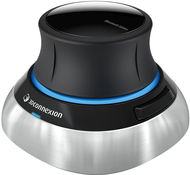
Interested in reviews of 3Dconnexion SpaceMouse Wireless? It got 4.8 out of 5 stars from our customers. Find specific customer reviews of 3Dconnexion SpaceMouse Wireless below. We will appreciate if you also share your experiences with 3Dconnexion SpaceMouse Wireless after purchasing.
I've only had it for two days, but there's nothing to talk about here. The ultimate luxury for controlling 3D models in CAD and CAM. Once you try it, you don't want it any other way. You'll get used to it in an evening, though the beginning is harder. It is definitely necessary to make adjustments, as something is unnecessarily fast and vice versa. For example, in Bambu studio it was a bit nerve-wracking at first, until I found the "secret" menu for this HW (cmd + shift + M) (according to the help it's without SHIFT, but it minimizes the application: D) Basic setup/connection is simple. Tested on Windows and macOS. For me WIN is a better made SW. It is clearer and easier, better program detection. On macOS, it's strange. As a left-handed person I was also afraid of the controls (for the right hand), fortunately the 3D mouse is symmetrical and there is no disadvantage for us again.
control
Fluency
highly addictive
it's not a necessity, but once you try it, you can't get rid of it
design
weight
symmetrical
PRICE
no Easy Switch function for switching between devices
I've had my eye on this device for a long time. I was discouraged by the price because I don't work with cado or any 3d program on a daily basis. Then I had an accident and as a right-handed person I had to move the controls to my left hand. The mouse in my left hand is a bit of a problem in the cad. But with this, I can manipulate the object with my left hand just fine. I use it in FreeCad and Bledner. The controls are really natural, just a few minutes of trying. Another plus for me is that it works in Linux as well.
great device for 3d
quality workmanship
it also works in linux
higher price, but due to the very specific functionality I don't see it as a disadvantage
I have been using 3Dconnexion products for over 10 years. I've tried all the 3D mushrooms. For practical reasons, where I carry a mushroom in my backpack with my laptop all the time, this is the most practical. Until recently, I was using an older version with a dongle. That's why the bluetooth version had to come. It's very nice to not have to think about the dongle and pull it out of the PC every time I put it in my backpack (so it doesn't accidentally break). Compared to the older version, it has one disadvantage. The mushroom is completely smooth. I've attached a photo for comparison. On the older version (left), you can see that the mushroom is coated with something and this layer is scratched by use. It's a small thing, but it makes work very pleasant. I have to hold the new version tighter, which I'm not used to. After all, the mushroom is handled very gently, and suddenly I have to use a "rougher grip"? Maybe it's just a habit. Otherwise there is nothing to complain about and it is a great product.
Portability
Bluetooth
Compactness
The mushroom slips a little in my hand
0 ×Report
Automatic translation
P-DC1-WEB05
Einkaufen im HandumdrehenBequemes Einkaufen mit der Alza-App, wo auch immer du bist!More info »