



Reviews Lenovo ThinkPad Thunderbolt 4 Workstation Dock
Interested in reviews of Lenovo ThinkPad Thunderbolt 4 Workstation Dock? It got 4.4 out of 5 stars from our customers. Find specific customer reviews of Lenovo ThinkPad Thunderbolt 4 Workstation Dock below. We will appreciate if you also share your experiences with Lenovo ThinkPad Thunderbolt 4 Workstation Dock after purchasing.
User Reviews

Radek, Varnsdorf
Rated 23/08/2026, variant Lenovo ThinkPad Thunderbolt 4 Workstation Dock
Verified purchase
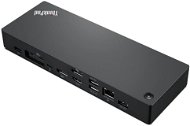
Works as it should. Here are some instructions, or rather experiences, that buyers might not be aware of. I was connecting a ThinPad P15 and a Philips 3000 series ultrawide monitor + an external mouse and keyboard (both wired). Pay attention to the port settings. When waking the laptop from hibernation, it matters how you connect the laptop to both video outputs for PBP mode. When waking from hibernation, the first signal goes to the DisplayPort and only then to the HDMI and USB-C / Thunderbolt 4. So, to prevent your monitor from "forgetting" its input settings, you must (or rather, this might not be the only way, but it works for me, and otherwise it was playing up) plug the DisplayPort into the docking station and the monitor, and connect the second video signal either from the laptop (which you don't want when you have a docking station), or ideally to the USB-C / Thunderbolt 4 (marked with a lightning bolt) on the docking station and to the HDMI on the monitor with a USB-C to HDMI cable, and set the monitor to PBP mode, where the main video input will be the DisplayPort and the input for PBP will be HDMI. Why? It's because all three video outputs—1x HDMI and 2x DisplayPort located next to and above each other—are on a single chip. When you turn on the laptop via the docking station, this chip gets overloaded, and only one signal goes to the monitor. The second one won't get through. Additionally, the DisplayPort starts working first, it has priority, and the other video ports follow. So if you set the main input on the monitor to anything other than DisplayPort, the monitor will get confused when you turn on the laptop and will mess up your input settings. That's why you need to ensure the primary input is from the DisplayPort and the PBP input is from HDMI, but that HDMI signal must come from the USB-C / Thunderbolt 4, which uses a different chip in the docking station and won't get overloaded. Hope that helps.
He's doing what he's supposed to do.
Handles a 34' ultrawide monitor.
Charging up to 300W, which is essential for the ThinkPad P15.
The price, that's really high.
0 ×Report
Automatic translation
Company
Rated 05/05/2026, variant Lenovo ThinkPad Thunderbolt 4 Workstation Dock
Verified purchase
A great docking station with up to 300W of power. It also works seamlessly with the Lenovo Yoga Pro 9i Aura Edition (model 2025), which reliably supplies enough power to power the RTX 5060. Over Thunderbolt 4, the maximum power consumption is around 75 W, and more than 150 W when using the Slim Tip connector. The only small thing is the non-functional power button on the dock - this function is only for ThinkPads.
Lots of ports
Without fan
Lenovo Slim Tip Connector with 230W
Could have been more ports on the front
0 ×Report
Automatic translation
