Try our cookies Alza.cz a. s., Company identification number 27082440, uses cookies to ensure the functionality of the website and with your consent also to personalisage the content of our website. By clicking on the “I understand“ button, you agree to the use of cookies and the transfer of data regarding the behavior on the website for displaying targeted advertising on social networks and advertising networks on other websites.
Alzak icon
Catalogue
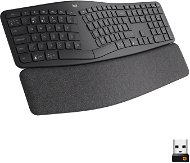
Logitech Ergo K860 Wireless Split Keyboard - US INTL - Keyboard

Reviews Logitech Ergo K860 Wireless Split Keyboard - US INTL

Interested in reviews of Logitech Ergo K860 Wireless Split Keyboard - US INTL? It got 4.5 out of 5 stars from our customers. Find specific customer reviews of Logitech Ergo K860 Wireless Split Keyboard - US INTL below. We will appreciate if you also share your experiences with Logitech Ergo K860 Wireless Split Keyboard - US INTL after purchasing.
100.90 €
In stock > 5 pcs
Add to Cart More Information

User Reviews

Ondřej, Prahaflag
Rated 19/07/2025, variant Logitech Ergo K860 Wireless Split Keyboard - US INTL
Verified purchase - review from a price comparison website
For the price, I would expect a much more durable keyboard. On the other hand, it is really comfortable with good quality keys. Very pleasant to use in the office and for games. Fantastic battery life. Easy pairing with bluetooth/USB.
Ergonomic
Bluetooth pairing to multiple devices
USB dongle - when using a dongle, there is no need to switch profiles between operating systems as with Bluetooth.
If you are using Linux and you have not compiled Kernel with bluetooth module, the keyboard will not work e.g. when writing the LUKS password. Works only from the login screen to the OS
It was fine for playing. Not suitable for pro gaming
Coding with it is a breeze. It's just wider hence the need to sometimes shuffle on.
Feet for tilting the profile
Multimedia keys
In 2.5 years I have not changed the batteries or charged it once. Unreal.
It doesn't have much resistance.
The tilt legs broke a few months after purchase. Some of the screws holding it together fell out on their own. But it kept working.
2.5 years after purchase, the left ctrl key is gone
Plastic, although it looks sturdy
Very expensive
0 ×Report
Automatic translation
Ladislav, Celakoviceflag
Rated 30/12/2024, variant Logitech Ergo K860 Wireless Split Keyboard - US INTL
Verified purchase - review from a price comparison website
Retrieved from
0 ×Report
Automatic translation
Daniel, Praha 10flag
Rated 21/10/2024, variant Logitech Ergo K860 Wireless Split Keyboard - US INTL
Verified purchase
I was buying as a replacement for the Surface Ergonomic keyboard, which was the best work keyboard I've ever had. (It was probably never sold here and Microsoft has unfortunately stopped producing it. ) At the same time, I recently got a Logitech MX Keys and I was kind of hoping that this keyboard would be such an "MX Keys" in an ergonomic design. Unfortunately, its quality is not that high. The K860 looks very "plastic". In addition, the surface of the keys is slightly "rough", I was used to "shiny", but maybe it's a matter of habit. What bothers me the most though is the weak feedback from the key press. Both of these keyboards "clicked" slightly when pressed, really only slightly, but it was a noticeable feedback. I'm missing it here, the exact place of pressing the switch is practically unrecognizable. Otherwise, the keyboard is nice overall, perhaps the wrist rest can be cleaned somehow (not detachable). I don't really understand AA batteries yet, why each product has a different charge. The MX has a battery, and all the Logitech mice I have do too. I don't mind it, but it just doesn't make sense.
key layout
wireless connection
switching of connected devices
plastic look and "feel"
very weak feedback from switches
AA battery instead of rechargeable battery
0 ×Report
Automatic translation
Lukáš, Praha 4 - Krčflag
Rated 05/03/2024, variant Logitech Ergo K860 Wireless Split Keyboard - US INTL
Verified purchase - review from a price comparison website
I was buying as a replacement for the Microsoft Natural Keyboard, because of the similar layout. But it has a vertical Enter, a short left shift (and another key instead of a length) - which I don't think is the US-intl layout as advertised on the box. The buttons are a little hard when you press them. A bit of a disappointment in that respect, but otherwise it's quite nice to write on. So I'll see how I get used to it - and I'm kind of hoping that another model will follow that will have the above shortcomings removed.
ergonomic keyboard, one of the few in the quality and price range
can be connected to up to 3 computers
integrated soft armrest
strange layout of some keys - and no other layout is available
buttons are a bit hard when pressed all the way down
the gaps between the function key blocks (the F keys and the entire top row, arrow keys and Ins-PgDn) are practically as large as between the keys themselves, so it's hard to find the boundaries between the blocks by touch.
instead of the right menu button (between right Alt and Ctrl) there is an Fn key - which is a pity, because I use it much less. The menu key is above the numeric keys - which already requires lifting your hand off the armrest.
powered by two AAA batteries - why doesn't it have a built-in battery like the Master series mice from the same manufacturer?
0 ×Report
Automatic translation
Olga, Praha 8flag
Rated 22/08/2023, variant Logitech Ergo K860 Wireless Split Keyboard - US INTL
Verified purchase - review from a price comparison website
In addition to its functionality, it also has a beautiful design.
0 ×Report
Automatic translation
Anonymous customerflag
Rated 07/05/2023, variant Logitech Ergo K860 Wireless Split Keyboard - US INTL
Verified purchase
The wrist problems immediately disappeared.
0 ×Report
Automatic translation
Customer, Český Krumlovflag
Rated 03/08/2022, variant Logitech Ergo K860 Wireless Split Keyboard - US INTL
Verified purchase
Barely usable
Cannot disconnect the wristpad
F keys are small
Small Enter key, always miss it
Wristpad texture is weird
Had troubles to connect it to existing USB dongle
0 ×Report
Jiří, Těšanyflag
Rated 08/04/2022, variant Logitech Ergo K860 Wireless Split Keyboard - US INTL
Verified purchase
In front of this keyboard I had a Microsoft Natural Ergonomic Keyboard 4000 and I typed without typos. I still get used to this and make mistakes, so even though they are both divided and similar in concept, there is a small difference that makes me difficult. Maybe if it was bent another few degrees, it would be better. But it' s definitely a habit. But otherwise I' m happy with how quiet the writing is, against the one from Microsoft. I also had MS Sculpt, which had classic keys with a larger area, which I would welcome with this keyboard. I have the F-keys permanently on, but since I' m used to controlling the volume from the keyboard, it' s annoying to twist my right hand to press Fn + F10 - F12. I would rather welcome the Fn key on the left side, as laptops have it (but to the right of the left Ctrl). I' ll keep the keyboard, but I hope the next generation will be better.
convenient
quiet
switching between computers
short right shift
the key for calling up the context menu is at the top right, out of reach of normal typing
backlight missing
0 ×Report
Automatic translation
Martina, Praha 6 - Dejviceflag
Rated 01/04/2022, variant Logitech Ergo K860 Wireless Split Keyboard - US INTL
Verified purchase
I use it for several hours a day and I am extremely satisfied. If you are looking for a quality keyboard and it does not suit you mechanical (due to noise) I definitely recommend. I think people have a black and white look on the ergo keyboard either you will love it or it will not suit you at all so I would first try a cheaper alternative before buying this. The price is quite high, but I don' t know of a cheaper, qualitatively identical alternative.
Perfect buttons
Ergo keyboard shape
Lower armrest
Pleasant quiet sound
Excellent support for Fn buttons with the ability to change functionality via Logitech software
Logitech software (new version not yet supported K860)
The front legs in combination with the bottom pad significantly increase writing comfort
Large dimensions
After two months, the bottom pad is visibly used
It is very difficult to use other keyboards once you get used to this, either because of the shape or the quality itself
Price
0 ×Report
Automatic translation
Martin, České Budějovice 1flag
Rated 23/01/2022, variant Logitech Ergo K860 Wireless Split Keyboard - US INTL
Verified purchase
I currently have a K850, I don't know if it's because this is EN, but I would take if the function layout on each model wasn't different - it's about getting used to a different key then. When I was used to certain functions, they are now elsewhere (on a different key) and some have a separate key and not via "Fn". What bothers me most is the placement of the feet (for elevation) - what is unusual is the elevation is not in the front (Fx keys), but at the bottom (pad under the hands). The main thing is that the tilting is towards you and not to the right / left side - so the whole keyboard must be on the table surface. The bug is that there is no space between the standard keys and the "Fx" keys, so it can happen that the user clicks "F6" instead of "z".
It's a bit unusual, but the user gets used to it.
Connection to 3 devices.
It seems to me that sometimes it does what it's not supposed to do (take an unwanted action)
For me, it's a larger keyboard - so I would move the flip-up feet more forward from the edge.
I'd like to see the legs folded out to the edge (right/left) instead of front to back (this way I can't have the keyboard on the edge of the desk, but more on the desk) - it takes up even more space on the desk
I miss the separation (gap) between the row of keys and the "Fx" keys - since it's such a bulky keyboard I would take those 3-5 mm for separation.
The lock, was taken via the "Fn" key and not a separate button - it happens to me that I inadvertently lock my computer.
0 ×Report
Automatic translation
1 - 10 from 12
P-DC1-WEB20

Bei uns findest du (fast) alles Wir haben über 75.000 verschiedene Produkte auf Lager. More info »