


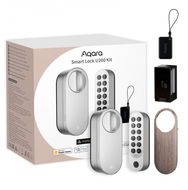
Reviews AQARA Smart Lock U200 Kit (EL-D02DS), silver
Interested in reviews of AQARA Smart Lock U200 Kit (EL-D02DS), silver? It got 3.7 out of 5 stars from our customers. Find specific customer reviews of AQARA Smart Lock U200 Kit (EL-D02DS), silver below. We will appreciate if you also share your experiences with AQARA Smart Lock U200 Kit (EL-D02DS), silver after purchasing.
User Reviews

Jiří, Petrovice u Karviné
Rated 27/12/2024, variant AQARA Smart Lock U200 Kit (EL-D02DS), silver
Verified purchase
Then satisfied
Everything works as it should
Nothing yet.
0 ×Report
Automatic translation

Anonymous customer
Rated 29/10/2024, variant AQARA Smart Lock U200 Kit (EL-D02DS), silver
Verified purchase
for a house/apartment with small children a necessity
my wife said this is the best smart thing I've got for the house
battery life surprised
we don't want another lock
0 ×Report
Automatic translation

Petr, Praha 9 - Kyje
Rated 04/10/2024, variant AQARA Smart Lock U200 Kit (EL-D02DS), silver
Verified purchase
EDIT: 18.10.2024: after 18 days absolute satisfaction in all respects. No failure and I don't have a single reservation. If the door opens a little on its own when you hold the arrow, it is ideal to put a small neodymium magnet between the door and the door, so that when the arrow is inserted it holds the door in the same position and can be locked again. That's just in case you're remotely in a pub and you've locked the door remotely: -) Top electronic lock for me. Safety does not increase your safety, the liner does that (ideally safe. cl. 4) and the door (ideally safe. cl. 3), but it will make it easier for practical situations when you are pulling something and don't have to hunt for keys. It's just a blast.
Super functionality
Scope of packaging
Perfect combination with ATV 4K, including Apple HomeKey
Easy installation, automatic calibration handled everything
Auto lock when the door is closed or after a set time
Holds the lock tongue well, max. setting 5s
With a short turn of the cradle, the motor tightens the rest
Reliable Apple Homekit notifications
The noise level even on fast mode seems fine to me
Apple Watch, iPhone, fingerprints, NFC card reliably functional.
Without the Aquara hub it takes a while for the Aqara Home App to establish a BT connection to the lock, but that's only in the case of setup or access management, the ATV makes up for it
I recommend an insert with a permeable coupling in case of discharge or failure
When changing settings it wants to confirm the keyboard press, even when checking the firmware.


0 ×Report
Automatic translation

Customer, Liberec
Rated 30/09/2024, variant AQARA Smart Lock U200 Kit (EL-D02DS), silver
Verified purchase
I have a Magnum security door from HT doors with a handle on the inside and a bow tie instead of a key. I have a non-rotating sphere on the outside. The condition for each el. the lock is a lock with an insert, so that it can be locked even if there is a key or a fixed mechanism with a bow tie on the other side. Without this, there is no point in considering any el. of the castle. I got it primarily to keep my kids from losing their security door keys outside. I primarily wanted a fingerprint + pin input (as a backup). This can also be opened with an NFC key fob, HomeKey, or mobile phone from the app. Installation is quite simple. There is also a video tutorial in the app. The easiest is with the key on the inside - it can turn the key head directly without an additional adapter. If you don't have a key but a bow tie like me, watch out. not compatible with Magnum doors. one adapter fits there by circumference (almost - I pressed it in a bit with a hammer), but the hole for screwing in the side screw (worm) doesn't fit anymore. Anyway, after pressing it held up great for about 1 week. then it loosened and it was a problem to open from the inside because the adapter on the shaft was turning - the round profile of the shaft on the door side was not a good idea. I had to dismantle it (a matter of one minute, but my wife probably wouldn't have known what to do). No other adapter is holding the circuit there, so I glued it there and so far it is holding - I have no other option. After unpacking it is a bit confusing what software to actually install. the text was about one SW, the QR code referred to the second SW and below the QR code was a description of the 3rd SW. I installed the original Aquara Home app. I must say that the SW is sophisticated. Only the English is machine - about 97% of the text is OK, but it can be a bit confusing in a few places, but nothing a layman can't handle. The important thing is that Aqara Home addresses what other users have criticized here. possibility to set the lock/door with an external non-rotating ball (maybe they used a different SW. ). After calibrating one and the other position (for unlocking and locking) you can click on "Hold latch" (meaning the firing pin) + the selected time (I give the shortest 1 second). After the bolt is captured, the motor continues past the calibrated position to engage the missile and the safety door is unlocked and bounces. After a second, the gun comes back out (calibrated motorcycle position) and I can slam it shut behind me normally as if I had opened the door with a key. I haven't had a problem with it yet. Locking can be done in 3 ways. By default, it is locked only manually - that is, by pressing a button on the keypad or by turning the mechanism. It can be set to auto-lock with a slam - that's what I use. When you slam the door, it locks. This only works based on impact (accelerometer). So if you hit the door when it's open, it locks. Then there is another similar possibility. locking after a certain period of time. When I slam the door (again, accelerometer detection), it locks after a defined time if the door has not been tampered with. I don't use it yet, but I'm thinking about it, because sometimes it happens that I go back and forth and some delay of say 5-10 minutes would be useful. But this way I know it's always locked. I slam and hear the lock The only thing I'm afraid of is that there could be a situation where it starts locking just before closing, then the bolt would hit the door and that would be unpleasant. But so far it hasn't happened. The auto-lock function is labelled "Lab" in the app, so it's a test function. If it is closed very carefully, it may not register the impact and lock. Then you need to press the lock on the keypad, or turn the mechanism inside. The rotation of the mechanism can be supported by a motor - recommended. Turning is not as comfortable as with the original bow tie or key. After activating the function, just turn the mechanism and it will turn as it should (there is only a delay of about a second). You don't address whether you have the right position. 2 speeds can be defined. when I turn slowly, the motor turns in slow/quiet mode. If I turn faster, it turns fast. Each mode (fast and silent) has a choice of 3 speeds (6 speeds in total). You can also set only one speed. On the speed of rotation. the fastest rotation is quite noisy. I wouldn't want to open like that in the morning or evening. And the slower modes are sometimes a nuisance. Therefore, you can set the time interval when it closes/opens. During the day I have a medium speed - I put my finger on it and it opens about the same as if I were turning a key. The fast mode is faster, but probably useless for me. At night and in the morning, I'm on silent mode. which is significantly quieter, but also significantly slower. I put my finger on it and wait about 8 seconds. If I tried to open the key quietly, it would also take me longer than normal. not 8 seconds, but again, it's quiet and comfortable. The external keypad looks nice on the door. I have a silver version on a darker door with imitation wood. The lock is quite large inside, but with the cover where the wood imitation is, it +- matches the door and I don't notice it as much as with the silver cover. The external keypad just sticks to the door via an adapter so you can take it off and change the batteries. The adapter has a magnet and the keypad has a hall sensor and when disconnected it will start beeping (stops with fingerprint, pin, card, phone). When you enter a wrong pin, card, or fingerprint it first rejects at normal volume, then louder with a different sound, and finally it starts blaring like an alarm. The volume can be adjusted and the time when the alarm can sound can be set. But I've had it active all day. When entering a pin, you can enter a random number, then the correct pin and continue with random numbers. and if there is a correct pin between the digits, it will unlock - this is to prevent someone from easily learning the correct pin. If you run out of batteries, you can open it normally with a key or by turning the mechanism, only the adapter has to hold: -). The keyboard is powered by 4x AAA. The bike comes with a lithium battery with USB-C connector and then a pencil battery holder that fits in place of the lithium battery, which is quite handy. you take out the original battery, put it aside to charge, and leave the adapter with the pencil batteries as a backup solution. or it comes with a cloth bag for the power bank, which can be hung by the handle and charge the battery when plugged in (you just need to leave the cover off). For remote or automated operation and control of the lock you need to have Aqara HUB M3 or newer (newer is not available yet). I don't have it, so I can't judge. But I can create a temporary pin. this can only be entered once. I normally connect to the lock via Bluetooth on my phone, but if I want to set something on the keypad (many settings are common), I need to manually wake up the keypad (by pressing any button) and then both are visible in the app. in addition to the settings, I also check the batteries, which I haven't charged yet. I've only had it running for less than a month. the keypad reports 100% and the lock 84%. Our lock does about 5-10 cycles a day. While I consider the lock to be secure, the lock is not for better security, but for easier opening. It's another opening. And I confess that I haven't quite figured out how the insurance company's view of theft claims is. Electronic locks, like mechanical locks, must meet safety standards and safety classes. These vary greatly by state and I assume this is not addressed by Aqara. But if you insured the house/apartment without information about the security doors (or the security class of the lock), it probably doesn't matter.
it works and it's comfortable
supplied with various adapters for mechanical connection to the lock (9 adapters + key head control option)
can be connected mechanically and directly to the key head, without adapter
the silver and black version comes with a wood imitation cover (looks nice)
shot return (door with non-rotating ball)
Google Home
HomeKit (incl. HomeKey) - not tested
Matter (for easy addition to the system)
It was also thought about how to recharge and not jeopardize the operation (two options)
Aqara Home app overview
larger lock size
noisier at higher unlocking/locking speeds
The adapter is not fully compatible with the Magnum door from HT door if you have a bow tie instead of a key (inside side)
0 ×Report
Automatic translation
Zdeněk, Omice
Rated 24/09/2024, variant AQARA Smart Lock U200 Kit (EL-D02DS), silver
Verified purchase
It works
Fingerprint perfect
Can be opened with a watch
Can be controlled remotely via Apple TV hub
She can pull the door tongue
Noisy Kapanek
0 ×Report
Automatic translation
Company
Rated 23/09/2026, variant AQARA Smart Lock U200 Kit (EL-D02D), black
Verified purchase
Reviews often mention that the lock starts to get noisy over time, making a rattling/grinding sound and sometimes failing to unlock. I experienced this same fault after about a year of use. If your motor is still running but the lock has trouble turning, the problem is in the gearbox. I disassembled the lock right down to the gearbox (it's not difficult, there are plenty of video tutorials on YouTube). I cleaned out the old lubricant and applied new grease. Since then, the lock has been working for another year without any issues and I'd say it even runs better and more smoothly than when it was new from the factory. Inside the gearbox is a combination of metal and plastic gears, which were mechanically fine and just needed some maintenance. IMPORTANT REPAIR NOTE:
Be careful with the amount of grease – don't use too much! On my first attempt, I overdid it and the lock didn't work correctly. I had to take it apart again and remove some of the grease, and only then did it work as it should. If you're a bit handy and have this problem, definitely give it a go, it's worth it.
0 ×Report
Automatic translation

David, Břeclav
Rated 12/09/2026, variant AQARA Smart Lock U200 Kit (EL-D02D), black
Verified purchase
It worked well, but only for two years and two months. Something inside the gearing broke right after the warranty expired, and now it just buzzes and growls but won't open.
apart from the fact that it only lasted for the warranty period, probably nothing
0 ×Report
Automatic translation

Michael, Boršov nad Vltavou
Rated 04/06/2026, variant AQARA Smart Lock U200 Kit (EL-D02D), black
Verified purchase
do not buy, lousy product
chopping
the outdoor keypad switches off
multiple complaints, still the same problem
the setting works in 1 out of 10 cases
tragic app with lousy translation
0 ×Report
Automatic translation
Adam, Brno
Rated 28/03/2026, variant AQARA Smart Lock U200 Kit (EL-D02D), black
Verified purchase
I have complained about the lock twice already and each time the same problem - broken connection and wrong calibration. The product behaves unpredictably, which is a major problem with the lock. Alza did not resolve the situation and only blamed it on the need to update the software. The update didn't solve anything, of course. Overall disappointing. For the money, absolutely unacceptable quality. I would definitely not buy this lock again.
Modern design
Theoretically interesting features (apps, smart controls)
Extremely unreliable connection to the app
Common lock calibration problems
Unstable functioning (sometimes not responding at all)
Low quality of workmanship relative to the price
Complaints without a real solution
0 ×Report
Automatic translation
Anonymous customer
Rated 26/02/2026, variant AQARA Smart Lock U200 Kit (EL-D02DS), white
Verified purchase
Broke after only 4 months
The gears stopped working after a few months
Alza won't accept the claim. I have to argue with them. It's holding me up.
0 ×Report
Automatic translation
