Try our cookiesAlza.cz a. s., Company identification number 27082440, uses cookies to ensure the functionality of the website and with your consent also to personalisage the content of our website. By clicking on the “I understand“ button, you agree to the use of cookies and the transfer of data regarding the behavior on the website for displaying targeted advertising on social networks and advertising networks on other websites.
We use 8 categories of cookies on our website:
Technical cookies
These are strictly necessary for the functioning of the website and the features you choose to use. Without them, our website would not work; you wouldn't be able to log in to your user account, for example.
Functionality cookies
These cookies allow us to remember your basic choices and improve the user experience. These include remembering your preferred language or allowing you to stay logged in permanently.
Social media cookies
These cookies allow us to easily link you to your social media profile and, for example, allow you to share products and services with your friends and family.
Content personalisation
These cookies allow us to show you content and ads according to the information we have about you to best meet your needs. This includes what content you have viewed, or on what device you are accessing our website.
Non-personalised advertising
These cookies allow us to show you general ads for products and services.
Personalised advertising
Thanks to these cookies, we and our partners can offer you relevant products and services based on your purchases, your shopping behaviour and your preferences.
Audience metrics
These cookies allow us to optimise our site for your convenience based on how you use it. The aim is to remember or anticipate your choices. This includes, for example, the use of features, their location, or the behaviour on the page.
Third party cookies
These are third party cookies, and you can find out more about them and our partners here.
By giving your consent to the processing of cookies, functionality and analytical cookies will be installed on the device you use to browse the website (click on the "I understand" button for both categories, or you can select only one of the categories by clicking on the "Settings" button). We always install technical cookies on your device, even without your explicit consent, because without them our website would simply not work.
You can revoke your consent to the processing of cookies. In connection with our company's cookie processing, you also have the following rights: the right to access cookies, delete, modify, supplement and correct them, restrict processing and the right to lodge a complaint with the Office for Personal Data Protection. Read more about your rights.
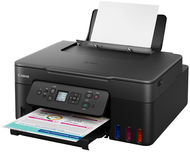
Interested in reviews of Canon PIXMA G3480 black? It got 4.5 out of 5 stars from our customers. Find specific customer reviews of Canon PIXMA G3480 black below. We will appreciate if you also share your experiences with Canon PIXMA G3480 black after purchasing.
Perhaps it doesn't have a paper tray under the printer. Just like the old one. Now it's more dusty when I don't print for longer. And it's pretty big. That may not be a disadvantage.
0 ×Report
Automatic translation
Customer, Praha
Rated 20/08/2025, variant Canon PIXMA G3480 black
Verified purchase
Great printer - appreciate the ease of printing over Wi-Fi (and scanning! ) via the app. Setup was pretty easy and I like the low ink cost. In the future, the service cartridge will need to be replaced when it fills with ink, and it is hard to find (MC-G07); I hope it's available soon. I've had a few problems here - faded colors and visible streaks. I'd like to describe how I solved them. At first the colors were like black, more like gray; After printing about 300-400 pages, it improved significantly. Maybe it's some sort of printer "crawl", I'm not sure. There are two types of stripes - the vertical ones are cog tracks and there is nothing you can do about that; usually disappear when the ink dries. Horizontal ones are more complex. Even with correct head alignment (did you align them? ), and by setting "High Quality" and the correct paper type, I was still getting them when printing double-sided (duplex). Now I'm convinced that the double-sided printing is to blame - the paper is still wet and its "stretch on wet" property changes. The printer normally waits 3 seconds before printing the second side; this can be changed in the web interface. What helped me the most was to make sure that the paper and the printer had room humidity. Next, try printing only one side first, letting the paper dry for a few minutes, and then printing the other side. I hope this helps!
easy Wi-Fi control
low ink costs
print and scan applications
can leave streaks - see my review for a tip on how I solved this
a little bigger than I imagined
need to print at least 1-2 times a month, otherwise the head will dry out
0 ×Report
Automatic translation
David, Praha 5 - Hlubočepy
Rated 09/07/2025, variant Canon PIXMA G3480 black
Verified purchase
Unfortunately, the Canon printer prints overlapping strips, which causes dark lines, but also a slight distortion of the image. The result is a poor quality print with visible image damage. In addition, the print from the mobile phone was very faded in colour.
In a direct comparison with the Brother DCP-T720DW and the HP Smart Tank 725, the HP clearly had the best print, but unfortunately it unacceptably refracted the paper, the Canon had too much image damage, so unfortunately the Brother won, which although it didn't have the best quality print, had the least serious print defects. In the attached photo is the right pair of photos from Brother, the left trio from Canon with visible banding, the top ones are from an Android mobile, the rest are Win11.
Easy installation on PC and mobile (the easiest)
PC printing has very good colours closest to the original
Printing from a PC produces dark streaks
The print from the mobile has very faded colours, but the stripes too
0 ×Report
Automatic translation
Customer
Rated 05/06/2025, variant Canon PIXMA G3480 black
Verified purchase
Cannot scan to flash, only via wifi to PC.
0 ×Report
Automatic translation
Jiří, Praha 9
Rated 28/05/2025, variant Canon PIXMA G3480 black
Verified purchase
is tank-like, no need to change the ink so often
no paper tray at the bottom of the printer
0 ×Report
Automatic translation
Tomáš, Ústí nad Labem
Rated 16/05/2025, variant Canon PIXMA G3480 black
Verified purchase
seamless cooperation with Linux
photo printing
reliability
0 ×Report
Automatic translation
Michal, Roudnice nad Labem
Rated 05/05/2025, variant Canon PIXMA G3480 black
Verified purchase
Sometimes it makes lines through the colour print
0 ×Report
Automatic translation
Jan, Havířov
Rated 07/04/2025, variant Canon PIXMA G3480 black
Verified purchase - review from a price comparison website
meets expectations, fast installation, wireless connection
0 ×Report
Automatic translation
1 - 10 from 28
P-DC1-WEB15
Schnell und zuverlässigBestellt bis Mitternacht, morgens in die AlzaBox gebracht!More info »