



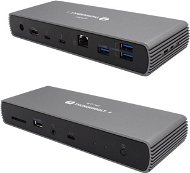
Reviews i-tec Thunderbolt 4 Dual Display Docking Station, Power Delivery 96W
Interested in reviews of i-tec Thunderbolt 4 Dual Display Docking Station, Power Delivery 96W? It got 4.6 out of 5 stars from our customers. Find specific customer reviews of i-tec Thunderbolt 4 Dual Display Docking Station, Power Delivery 96W below. We will appreciate if you also share your experiences with i-tec Thunderbolt 4 Dual Display Docking Station, Power Delivery 96W after purchasing.
User Reviews

Petr, Praha 5
Rated 11/12/2024, variant i-tec Thunderbolt 4 Dual Display Docking Station, Power Delivery 96W
Verified purchase - review from a price comparison website
Compatible with both Windows and MAC. When a 4k monitor is connected via the TB port, the transfer rate of the external SSD on the TB4 port drops below 3Gb/s. Another interesting limitation is that if you connect USB from a KVM switch in a monitor with a keyboard and mouse to the hub, it only works in the front USB-A port. Connecting a 4k monitor via HDMI, TB4 port in the hub and TB5 port from MAC M4 works without any problems including color management.
TB4 hub at a reasonable price
Nice workmanship, aluminium body
It is quiet and yet remains lukewarm during operation
Mouse and keyboard connection from KVM switch to front USB-A port only or to rear TB4 ports when connecting NTB to front TB4 port
0 ×Report
Automatic translation

Mojmír, Studénka
Rated 28/09/2024, variant i-tec Thunderbolt 4 Dual Display Docking Station, Power Delivery 96W
Verified purchase
I really like the dock, very handy, when connecting the Macbook Pro M1 everything worked instantly and reliably, EXCEPT external USB hubs. I only got half of one of the two up and running. Unfortunately, the 4 USB-A ports on the dock alone, with 3 more on the back, are not enough for me, so I'm returning it.
For others, I will mention that 4K image at 60Hz will take about half of the transmission capacity, it is necessary to take this into account. Extra fast SSDs are then already limited.
speed - handles really maximum transmission capacity
seamless monitor connection (HDMI) - 4K/60Hz jumped right in without flickering
Problematic connection of USB hubs, the additional ports do not work with daisy chained ones, at best you can connect devices to 3 ports, at worst nothing works
0 ×Report
Automatic translation
Anonymous customer
Rated 23/05/2024, variant i-tec Thunderbolt 4 Dual Display Docking Station, Power Delivery 96W
Verified purchase
It does what it promises
Sometimes after the first switch on, the ethernet does not work and requires a restart (dokins, not PC)
0 ×Report
Automatic translation
Ondřej, Hlučín - Bobrovníky
Rated 21/03/2023, variant i-tec Thunderbolt 4 Dual Display Docking Station, Power Delivery 96W
Verified purchase
Satisfaction with apple computers, everything works. Unfortunately it does not work on my service Yoze, Lenovo yoga C940-14iil, I have to return. I'll try ordering an original Thinkpad dock.
processing, materials
size
port number
hdmi 2.1
3x TB
works great with macbook
unfortunately it is not universal
0 ×Report
Automatic translation

Patrik, Praha Smíchov
Rated 20/03/2023, variant i-tec Thunderbolt 4 Dual Display Docking Station, Power Delivery 96W
Verified purchase
So far, maximum satisfaction. After troubles with similar devices from other brands, finally something that works instantly and well. I use with MacBook Pro M1 Max, I have three monitors connected, the third one works only with DisplayLink manager installed. I bought the device because several times a day I had to disconnect all the cables and go to a meeting, and I got tired of it. I used to use the HP G2 drive, but after each connection I struggled with the fact that some monitors didn't connect and I had to disconnect and reconnect the cable several times before it caught on. Great is the included cable TB4, which is flexible (no stiff bitch), I use it with a magnetic coupler, and I am satisfied. It's a pity that such magnetic connectors (USB-C 24pin) are not sold by alza, it is a waste of usb connectors.
Enough usb port
Flexible TB4 cable
Everything works with MacBook M1
Small, doesn't take up much space
The second monitor connected usb-c to usb-c only works at 30Hz, but maybe it would be enough to change to usb-c to HDMI
0 ×Report
Automatic translation
