
Try our cookies Alza.cz a. s., Company identification number 27082440, uses cookies to ensure the functionality of the website and with your consent also to personalisage the content of our website. By clicking on the “I understand“ button, you agree to the use of cookies and the transfer of data regarding the behavior on the website for displaying targeted advertising on social networks and advertising networks on other websites.
Alzak icon
Catalogue
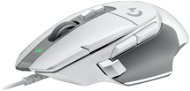
Logitech G502X White - Gaming Mouse

Reviews Logitech G502X White

Interested in reviews of Logitech G502X White? It got 4.4 out of 5 stars from our customers. Find specific customer reviews of Logitech G502X White below. We will appreciate if you also share your experiences with Logitech G502X White after purchasing.
69.90 €
In stock > 5 pcs
Add to Cart More Information

User Reviews

Milan, Šumperkflag
Rated 24/02/2026, variant Logitech G502X White
Verified purchase - review from a price comparison website
No backlight
No backlight
0 ×Report
Automatic translation
Tomáš, Chebflag
Rated 25/07/2025, variant Logitech G502X White
Verified purchase
Works great
Nice configuration in G Hub
Looks very nice, surprisingly doesn’t get dirty
Feels a bit light, cheap and plasticy, especially compared to G502
The button to change mouse wheel mode sometimes stays pressed, but it’s not that big of a deal
0 ×Report
Petr, Brnoflag
Rated 14/07/2025, variant Logitech G502X White
Verified purchase
Lightweight
All plastic (no foils or stickers)
Plenty of buttons for bins and play
The cable could be braided
The anti-slip rubber will peel off very quickly, but I guess it depends on how often you hold the mouse in your hand
Not suitable for larger or big hands (it sometimes hurts my fingers)
0 ×Report
Automatic translation

Richard, Praha 6 Veleslavínflag
Rated 26/06/2025, variant Logitech G502X White
Verified purchase
Ergonomics
Double wheel operation
Lots of buttons
Feedback
0 ×Report
Automatic translation
Companyflag
Rated 26/05/2025, variant Logitech G502X White
Verified purchase
Returned. The price absolutely does not correspond to the quality.
number of buttons and their layout
processing is not inferior, but downright bad
microswitches like on a mouse for 60, -
plastic wheel, without weights
extremely lightweight
0 ×Report
Automatic translation
Companyflag
Rated 08/05/2025, variant Logitech G502X White
Verified purchase
the only rodent without RGB backlighting with extra buttons and extra functions on the wheel
gets along fine with Linux
low; I have big hands and either I have to break my thumb or I repeatedly press the side button and my palm is in the air, so my wrist starts to hurt almost immediately, I haven't had this problem with other mice
unbraided cable
0 ×Report
Automatic translation
Jaroslav, LOVOSICEflag
Rated 13/11/2024, variant Logitech G502X White
Verified purchase
It fits the hand exactly, I was looking for a mouse to play War Thunder where you need a lot of buttons to control and don't want to chase them around the keyboard. This is exactly the mouse that suits me in every way, it just needs the buttons in the app to be swapped instead of the Dpi and the scroll wheel to the side like a button on a keyboard. The mouse is light and nice to play with, the wheel can be switched to fast zoom and opposite (very sensitive), which is also great, especially when you need to react quickly and track targets from the sky. for me, only pluses. A few mice have passed through my hands over the years and here I finally found what I was looking for. I think more demanding players will quickly fall in love with it.
appearance
position of buttons
sensitivity setting
weight
fits precisely in the hand
the first mode wheel clicks and is stiff
noisier clicking of buttons (may bother some people)
pretty much nothing that I personally mind.
0 ×Report
Automatic translation

Ondřej, Karlovy Vary 4flag
Rated 04/10/2023, variant Logitech G502X White
Verified purchase
The configuration app requires Win10, but if you save the configuration directly to the mouse, the button assignment works even on older Windows.
fits well in a larger hand
Tilting wheel
configuration application desperately unintuitive and incompatible with Win7
0 ×Report
Automatic translation

Jan, Čelákoviceflag
Rated 12/03/2023, variant Logitech G502X White
Verified purchase
Looks really nice even without RGB
The jams at the wheel top at games will be decently exploited.
Overall weight etc is pretty cool.
the processing of the mouse I would rate at 70% has unfortunately some shortcomings.
The mouse cable as if it cost 200kč unfortunately: /
the mouse is more for a larger hand I can't reach the front buttons with my finger so I don't have to put the mouse to my side
I'm a sucker for RGB and it could at least light up the logo but it still looks pretty good: -)
0 ×Report
Automatic translation
Anonymous customerflag
Rated 07/10/2022, variant Logitech G502X White
Verified purchase
As a long-time user of the Yenkee Hornet 3009, I was forced to switch to another brand, because Yenkee apparently no longer makes nice, high-quality gaming mice. After researching the market, I found to my dismay that the only mouse that looks at least a little bit similar and is at least a little bit gaming is this one. I ordered one and, quite frankly, returned the mouse almost immediately. And believe me, if there was something else on the market, I would do it. I' ll start with what several people mention about the 502. You have a “premium“ mouse here that really doesn' t cost much, and some genius thought to put a non-braided cable that is as thin as a pencil lead and you are literally waiting for it to break. Totally illogical, but as I say. there is nothing else to take. The following is the control software that was invented by an absolute genius, but without it you can throw away the mouse. I wish you a pleasant half hour clicking your way through the UI for which you get fired from companies so that you can set up the mouse. And now to the mouse as such. First of all, I don' t know what “genius“ designed that mouse, but not only should he be fired (and some would say slapped), he should be banned for life from designing ANYTHING. The first thing that hits you in the face and in the finger is the small LMB on which two other buttons are parasitic, “pleasantly“ on the edge. Well, it really leads to missclick. If you don' t want a missclick, you have to hold your finger in a narrow and shallow groove just as wide as the index finger and no more than a mm. For the sake of interest, I am a person with “thieving fingers“, so if you have a good paw, unlike me, you will also have a finger on the buttons that are quite sensitive and not just on the LMB. And anyone who has ever played a game where you have to click more than three times per minute knows that your finger moves around the mouse quite a lot and in the heat of the game you *cannot* keep it in one place. And here we come to a brilliant setup, again. Because you know what those buttons do? They increase and decrease DPI. Next to LMB. Yes, you read that correctly. Someone thought of putting the DPI change buttons next to the Action/Shoot button. Because EVERY gamer wants to slightly trip over a button in the middle of trying to shoot someone and absolutely destroy their aim with a sudden DPI change. I recommend resetting it or just setting it to empty. Well, let' s continue the figure skating, right? Another genius button this time is located on the left side, where people usually have their thumb. Again, it' s a very sensitive button that you press even if you don' t want to. And guess what he does again? It lowers the DPI to 800. Although only as long as you hold it (maybe there' s a way to set it to a toggle, but I haven' t found it), but it' s more than enough to throw off the aiming. LUCKILY, someone thought that maybe it could be removed and replaced with a cover. However, disassembly takes place basically by pulling out the button, when I was really afraid that I would damage the mouse. The instructions for this process, which are literally on the carton in which the mouse arrived, are not very helpful. It would seem that the design flaws of the mouse must end there, but the opposite is true. We have almost the last thing of genius here. The mouse wheel and its dual mode. Basically, you have a so-called “flywheel“, i. e. we scroll without grooves. The wheel is hypersensitive, so a light touch will send you somewhere on the North Korean website and then back. I guess I don' t have to say that mode is unusable, right? Fortunately, it can be turned off, although not without difficulties. Under the wheel is a pair of buttons, of which the upper one is used to switch these modes. You will have to click about five times before the new mode will stick and the wheel will want to fit into the grooves. Finally won? But somewhere. I' m just getting to the last part now. Oh my goodness that mouse is LOUD. Clicking sounds incredibly high and thin, and scrolling is about as noisy as dragging plastic across concrete. Judging by the smoothness of the movement of the wheel, I will not be far from the truth. All in all, for such a price? Regular theft. If there was a decent selection on the market, this monstrosity would not be sold. But unfortunately, it's not. So whoever you have to buy this, good luck. If you don' t have to, be happy and watch your mice like an eye in your head, because who knows when someone will light up and make a mouse that is normal.
Nice colour, the combination of white and grey matches
Fits the hand well
Medium size
Lightweight
Button design and placement
A cable just waiting to break
Control software
Price
The wheel and its unusable dual modes
The pad prevents a clean reading of the mouse movement so say goodbye to the lacquer on the table. And if you have a glass table, you can't play.
Clicking and scrolling sound
The scroll wheel in normal scrolling mode suffers from rough movement
0 ×Report
Automatic translation
1 - 10 from 34
P-DC1-WEB25

Über 200-mal in Wien und Umgebung Genieße die 24/7-Abholung aus der AlzaBox. More info »


