



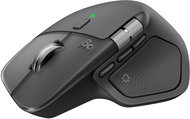
Reviews Logitech MX Master 4, Graphite
Interested in reviews of Logitech MX Master 4, Graphite? It got 4.5 out of 5 stars from our customers. Find specific customer reviews of Logitech MX Master 4, Graphite below. We will appreciate if you also share your experiences with Logitech MX Master 4, Graphite after purchasing.
User Reviews

Petr, Praha
Rated 14/10/2026, variant Logitech MX Master 4, Graphite
Verified purchase
The best work mouse on the market
Extremely quiet
Fits perfectly in the hand
Nothing
0 ×Report
Automatic translation

Anonymous customer
Rated 21/09/2026, variant Logitech MX Master 4, Graphite
Verified purchase
I've had all versions of the MX, but the ergonomics of the MX 4 don't suit me at all.
Nice build quality, quiet and precise switches, the best scroll wheel with a freewheel.
Compared to the 3S, it has a different shape and ergonomics. The index finger rests in an unnatural position, and it's harder to grip when moving it on the mouse mat. 150g is too much for all-day use.
0 ×Report
Automatic translation
Antonín, Chrudim
Rated 16/09/2026, variant Logitech MX Master 4, Graphite
Verified purchase
See other customers' positives, e.g. the beautiful free-scroll wheel, lots of buttons with configuration options, quiet.
You can't use the Logitech Onboard Memory Manager software, you have to install Logi Options+
The polling rate is only 125Hz. Although it's not a gaming mouse, it's a bit strange to put such a slow sensor in a mouse of this calibre - the cursor therefore stutters when used with a 144Hz+ monitor and it's not pleasant to play with - it's not a gaming mouse!
0 ×Report
Automatic translation
Anonymous customer
Rated 30/08/2026, variant Logitech MX Master 4, Graphite
Verified purchase
quiet
infinite scroll
the material gets dirty more easily
solid remote connection
After less than a year of use, the left mouse button is broken (doesn't click on the first press, randomly double-clicks).
Just like the large side "button", the wheel click is incredibly stiff and uncomfortable to press.
pretty poor ergonomics for someone who doesn't rest their hand on the mouse, but holds it in a claw grip
The software for setting up the mouse is basically spyware from Logitech. You can't even get the mouse to remember any settings; it's a brick unless their software is actively running.
Considering what a piece of rubbish this is, the price is absolutely dreadful.
0 ×Report
Automatic translation

Customer, Vinařice u Kladna
Rated 14/08/2026, variant Logitech MX Master 4, Graphite
Verified purchase
It's simply perfect (for my hand and for work).
The best mouse on the market.
The new surface of the mouse is much nicer than on the previous MX3 model.
nothing
0 ×Report
Automatic translation

Michal, Praha 10 - Strašnice
Rated 29/07/2026, variant Logitech MX Master 4, Graphite
Verified purchase
The handle is too high, and because of the slight angle, your wrist and arm never really get a rest. To be honest, I don’t know who would dare call this an ergonomic mouse, because even a mouse costing a few hundred has better ergonomics than this monstrosity. The feel of the mouse is odd, the double-click feels odd too; the mouse is heavy – I really don’t know – but for me, this is a product that’s completely off the mark and doesn’t deliver what you, as a customer, are paying for. I returned this pen the very next day because it’s a real pain to use.
Functions
Ergonomics
0 ×Report
Automatic translation
Customer, Prague
Rated 24/07/2026, variant Logitech MX Master 4, Graphite
Verified purchase - review from a price comparison website
A (slightly) higher price
My best mouse so far
0 ×Report
Automatic translation
Company
Rated 19/06/2026, variant Logitech MX Master 4, Graphite
Verified purchase
The transition from the 2S master was a bit of a hassle. The mouse is heavier and, despite being a similar size, it’s completely different; the ergonomics aren’t right – a big disappointment. The haptic feedback tends to drive up the price; as for its practical use, I’m not so sure. Otherwise, swapping the plastic for a rubberised finish is probably a good idea. And the sound is brilliant!
A very pleasant, quiet sound
Ergonomics
Weight
Haptics
Price
0 ×Report
Automatic translation
Anonymous customer
Rated 10/06/2026, variant Logitech MX Master 4, Graphite
Verified purchase
It's brilliant – I switched to it from the MX Master 3, which I took to work (my employer certainly won't pay for such an expensive mouse)
Incredibly quiet clicking. You can’t even call that clicking anymore. But I guess it's a matter of habit.
I’ve preferred Logitech mice for about 20 years now, and I can’t recall any of them ever letting me down.
It’s a bit more expensive, but in my opinion it’s definitely worth the investment.
0 ×Report
Automatic translation
Anonymous customer
Rated 27/05/2026, variant Logitech MX Master 4, Graphite
Verified purchase
After long experience with MX Master 2S and 3S I have to say that 4 is for me an evolution in the right direction. I have bigger hands and the 4 is easier to work with than the 3S. At least in terms of feel, the 4 is also heavier, which is fine with me. With previous generations, I had problems with the rubberized surface of the mouse - cleaning, over time an unpleasantly shiny surface, after a while, the hidden thumb button always stopped working for me. 4 does not have a rubberized surface, but a similar effect is achieved by the texture on the hard plastic. Thumb wheel has less resistance than the 3S, again a change for the better. Logi+ app is still not perfect, but usable yes.
Ergonomics
The surface is not rubberised
Extra button
Better thumb wheel
0 ×Report
Automatic translation
