



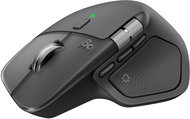
Reviews Logitech MX Master 4, Graphite
Interested in reviews of Logitech MX Master 4, Graphite? It got 4.5 out of 5 stars from our customers. Find specific customer reviews of Logitech MX Master 4, Graphite below. We will appreciate if you also share your experiences with Logitech MX Master 4, Graphite after purchasing.
User Reviews

Anonymous customer
Rated 11/05/2026, variant Logitech MX Master 4, Graphite
Verified purchase
After about half a year both buttons started to go wrong, double click or not respond at all to press. From the complaint came a mouse with silent switch only on the right button. Total waste of money.
Material
Size and shape
Silent switches until they broke.
Scroll wheels
Polling rate horrible, receiver must be close to mouse or it will start chopping
The switches went out after half a year of use
For some, maybe difficult
0 ×Report
Automatic translation

Karel, Smiřice
Rated 11/05/2026, variant Logitech MX Master 4, Graphite
Verified purchase - review from a price comparison website
It's a matter of habit, she's not convinced
0 ×Report
Automatic translation
Company
Rated 25/04/2026, variant Logitech MX Master 4, Graphite
Verified purchase
I'm going back to MX Master 3.
Very disappointing due to much worse ergonomics compared to the MX Master 3.
The right button gets stuck, and I have to push it with great force.
It was not a forward movement.
0 ×Report
Automatic translation
Company
Rated 01/04/2026, variant Logitech MX Master 4, Graphite
Verified purchase
I'm definitely not buying anymore
Compared to MX 3S poor ergonomics for larger hands (hand pain after a few days of use)
Significantly less accurate, it seems to jam compared to the S3
New features annoy rather than benefit
0 ×Report
Automatic translation

Ondřej, Rokycany
Rated 23/03/2026, variant Logitech MX Master 4, Graphite
Verified purchase - review from a price comparison website
The ultimate in productivity mice. Weight approx. 150g.
MX4 is another upgrade. It has a separate thumb section made of soft plastic instead of rubber - much less greasy and easier to clean. Also, an additional thumb button has been added and the position of the horizontal scroll wheel has changed slightly.
The thumb button for gestures is also (finally! ) presses sideways (i.e. by gripping the mouse in the hand) and not downwards (by pressing the mouse to the surface). At the same time, it is far enough forward to prevent accidental squeezing. Gestures can finally be used for real.
Overall, the rest of the mouse has a slightly harder finish than the previous MX3 and MX3s and better grease resistance. The quality control of the electronic wheel brake, which often caused problems in previous versions, has also been improved.
High sensor accuracy even on glossy surfaces. I run my mouse on laminate and it has no problem with it at all. Works perfectly even on glass!
The software on Windows and Mac is functional, unfortunately Options+ is a little bit slower than Options. Support on Linux (third party, solaar) is unfortunately slightly lacking. Gestures can also be set up, but don't expect intuitiveness. Otherwise, it's working as it should. (You won't find Flow, i.e. moving between desktops, on Linux, of course. )
Unfortunately, the mouse lacks the ability to save settings to internal memory. So without the app, you have "only" a very precise mouse in your hand with a switchable scroll wheel, thumb buttons forward-backward and gestures that will find use in a heartbeat.
Despite a handful of ailments, I highly recommend this mouse.
Native support for Windows and macOS
partial support for Linux (solaar), you can even connect it to Android
Ergonomic
caster with stepping and flywheel
number of programmable buttons
BT or dongle connection
Very accurate sensor even on problematic surfaces
horizontal wheel (free mode only, i.e. no stepping)
independent connection of up to three devices
imperfect support for Linux because Logitech
no settings in the internal memory of the device - without installed software it only runs in standard settings
0 ×Report
Automatic translation
Vojtěch, Budišovice
Rated 14/03/2026, variant Logitech MX Master 4, Graphite
Verified purchase
Better build compared to MX 3S
Quieter than its predecessor
Haptics
About the button more
Side scroll
Adjustable main scroll resistance
More ergonomic shape
Great grip
Great battery life
0 ×Report
Automatic translation
Sára, Brno
Rated 07/03/2026, variant Logitech MX Master 4, Graphite
Verified purchase - review from a price comparison website
It is too big for me, but otherwise functionally unbeatable mouse.
Haptic button
Silent button clicks
Totally customisable
Size
Weight
0 ×Report
Automatic translation
Company
Rated 18/02/2026, variant Logitech MX Master 4, Graphite
Verified purchase
the side button does not have a pleasant surface, dirt settles in the grooves
0 ×Report
Automatic translation
Anonymous customer
Rated 27/01/2026, variant Logitech MX Master 4, Graphite
Verified purchase
My first better mouse and I'm totally happy with it. The action ring occasionally fails (SW), but I use gestures on the mouse much more, which work flawlessly. The initial enthusiasm for the Action Ring has worn off, so I don't mind that sometimes it doesn't work at first. At first I also used a USB dongle, but I found the mouse worked much better over BlueTooth, so I stopped using it immediately.
Great mouse, I don't regret the investment
possibility to set gestures to any button
Super vertical and horizontal scrolling
I estimate the battery life to be 2 months on a single charge.
Sometimes Action Ring doesn't work at first - because of SW
0 ×Report
Automatic translation

Sára, Brno
Rated 18/01/2026, variant Logitech MX Master 4, Graphite
Verified purchase
finally a USB C dongle
haptic button, which can be replaced by software also with other Quick Access Popup mice, so it is not such an innovation and this button does not work with gestures
is heavy
cable not included
0 ×Report
Automatic translation
