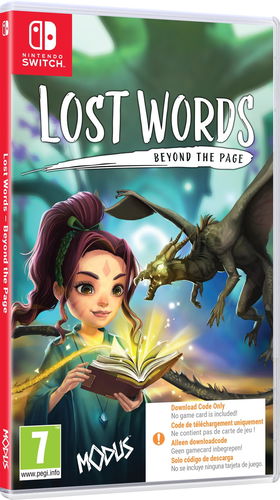
Console Game - Nintendo Switch, boxed version, key for Nintendo eShop , English subtitles and voice-over, genre: Arcades and Adventure - An adventure game with an unusual story, fresh puzzles and a unique atmosphere, taking place on the pages of a diary belonging to a young girl. Follow the direction of an engaging narrative written by the famous author of game stories, Rhianna Pratchett and accompany a young girl eager to become a writer in the extraordinary, fantastic world of Estoria, in which words rule with immense power.
Lost Words: Beyond the Page - Nintendo SwitchDiscontinued
Lost Words: Beyond the Page - Nintendo Switch
Awarded title
Browse through an emotional story from the pen of well-known playwright Rhianna Pratchett. Explore the hidden worlds of reality and fiction that unfold in the pages of young girl Izzy's diary.
Breathtaking visual style
Discover the watercolour world presented in the pages of the journal and the vibrant fantasy world of Estoria. Put yourself in the role of a little heroine and try to save the fantasy world from extinction.
Innovative gameplay
Use the words from the diary to change the environment and create a safe passage for the protagonist in a completely unique and refreshing platforming style.
Specifications
Genre
Arcades
Text
DE, EN
Dubbing
DE, EN
Age limit
7 years
Platform
Nintendo Switch - box
Genre
Genre
Arcades
Localisation
Text
DE, EN
Dubbing
DE, EN
PEGI rating
Age limit
7 years
Version
Platform
Nintendo Switch - box
Edition
Basic
Topic
RPG and Adventure
Version
Type
Game
Platforms (compatible)
Nintendo Switch
Licence
Box
Key for
Nintendo eShop
Multiplayer
Supported number of players on the local screen
1
Max. number of players on the local screen
1
Release date
Year of release
2021
Month of release
July
Virtual reality
Virtual reality
Not supported
More Specifications
The purchased Nintendo Switch product code must be activated in Nintendo eShop, which can be found in the console menu:
1) Select "Nintendo eShop" on the HOME Menu.
2) Select the account you want to use.
3) Select “Enter Code” on the left side of the screen.
4) Enter the 16-character download code and click "Confirm".
5) The game will begin downloading once the code is confirmed.
The purchased 3DS / 2DS product code must be activated in Nintendo eShop, which can be found in the console menu:
1) Select "Nintendo eShop" on the HOME Menu.
2) Select "Menu" followed by "Redeem Download Code".
3) Click the box labeled "Enter a download code".
4) Enter the purchased code and click "OK".
5) Click "OK" again and select "Download Now" to start downloading.
Note:
Note that some games may require:
a digital store account with a particular service - MS Store, Origin, Steam, Uplay etc. (you can find out more in our article on how to apply your electronic licences)
broadband internet connection for online gaming, initial setup, updates, and more
a monthly subscription fee for online multiplayer gaming (Xbox Live, PlayStation Plus, etc.)
Specifications can be changed without notice. Images are for illustrative purposes only.
Try our cookiesAlza.cz a. s., Company identification number 27082440, use cookies and other data to ensure the proper functioning of the website and, with your consent, also, among other things, to personalize advertising and the content of our websites. By clicking on the “I understand“ button, you agree to the use of cookies and the transfer of data regarding the behavior on the website for displaying targeted advertising on social networks and advertising networks on other websites.
We use 8 categories of cookies on our website:
Technical cookies
These are strictly necessary for the functioning of the website and the features you choose to use. Without them, our website would not work; you wouldn't be able to log in to your user account, for example.
Functionality cookies
These cookies allow us to remember your basic choices and improve the user experience. These include remembering your preferred language or allowing you to stay logged in permanently.
Social media cookies
These cookies allow us to easily link you to your social media profile and, for example, allow you to share products and services with your friends and family.
Content personalisation
These cookies allow us to show you content and ads according to the information we have about you to best meet your needs. This includes what content you have viewed, or on what device you are accessing our website.
Non-personalised advertising
These cookies allow us to show you general ads for products and services.
Personalised advertising
Thanks to these cookies, we and our partners can offer you relevant products and services based on your purchases, your shopping behaviour and your preferences.
Audience metrics
These cookies allow us to optimise our site for your convenience based on how you use it. The aim is to remember or anticipate your choices. This includes, for example, the use of features, their location, or the behaviour on the page.
By giving your consent to the processing of cookies, functionality and analytical cookies will be installed on the device you use to browse the website (click on the "I understand" button for both categories, or you can select only one of the categories by clicking on the "Settings" button). We always install technical cookies on your device, even without your explicit consent, because without them our website would simply not work.
You can revoke your consent to the processing of cookies. In connection with our company's cookie processing, you also have the following rights: the right to access cookies, delete, modify, supplement and correct them, restrict processing and the right to lodge a complaint with the Office for Personal Data Protection. Read more about your rights.