



Nuki BRIDGE white
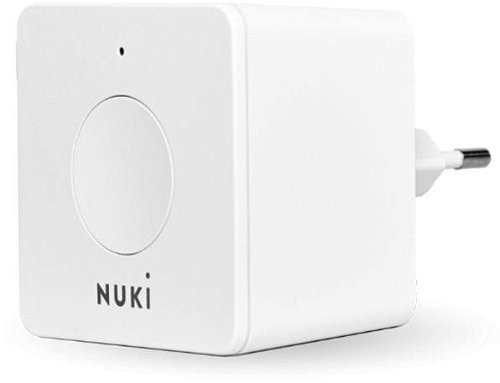


Nuki BRIDGE white
When Smart Lock is connected to Nuki Bridge, you get remote access to your front door. With the Nuki App, you can unlock and lock the lock, assign access rights and access remotely. You can also control the Smart Lock conveniently from Nuki Web or through voice assistants like Amazon Alexa and Google Assistant. NUKI BRIDGE allows you to create up to 200 virtual keys for your family and friends. Virtual keys can be time limited or set to repeat. NUKI BRIDGE is compatible with both iOS and Android. The distance between the key and the NUKI BRIDGE should be no more than 5 metres. The Bridge communicates via Wi-Fi 2.4 GHz or Bluetooth 5.

Key features of the NUKI BRIDGE Wi-Fi interface, white
- Lock and unlock doors remotely from anywhere
- Remotely manage up to 200 permanent or temporary keys
- Monitor real-time log of lock activity
- Control via iOS and Android app and web
- Connect your lock to Amazon Alexa and Google voice assistants
- Easy installation and quick configuration via mobile app
- Compact dimensions 60 × 60 × 50 mm for easy wiring
Compatible with the Google Home platform
Through the Google Home app, you'll be able to control smart bulbs, thermostats, cameras or speakers, all from one place, by touch or voice. Set up everything you need by following the on-screen instructions in the app installed on your smartphone. Google Home supports thousands of devices from different manufacturers.
Compatible with the manufacturer's app
To use the product's smart features, you need to add the device to the manufacturer's app. For more information about the application (name, supported OS, supported languages) and how to add a device to the application, please refer to the product manual.

Smart NUKI BRIDGE features
Simply connect the NUKI BRIDGE via your home Wi-Fi network. You can do everything step by step using the smart Nuki app. You'll be ready in less than 3 minutes! There is a button and LED light on the NUKI BRIDGE for initial setup. Bridge is needed for Smart Home integration, such as Amazon Alexa or Google Home. With the Bridge you can control the Smart Lock remotely very easily. Just install the Nuki App or Nuki Web for your computer.

Manage your Nuki Smart Lock remotely
NUKI BRIDGE should be plugged in close to the Smart Lock. The Bridge requires standard Wi-Fi (2.4GHz network) and a standard power outlet (100-240V). It acts as a bridge that connects your Bluetooth smart lock to your home Wi-Fi network. To ensure a stable connection, it is recommended to place it within 5 meters of the lock. The entire configuration is simply done step-by-step in the Nuki mobile app, giving you the ability to control the lock from anywhere in the world and enabling integrations with voice assistants.
Specifications
Use
Connectivity
Connection

Nuki Home Solutions GmbH, Münzgrabenstraße 92/4, 8010 Graz, Austria, https://nuki.io [email protected] +43 676 8415 68754
Specifications can be changed without notice. Images are for illustrative purposes only.
