



14" VERBATIM PMT-14 ALU FRAME TOUCH
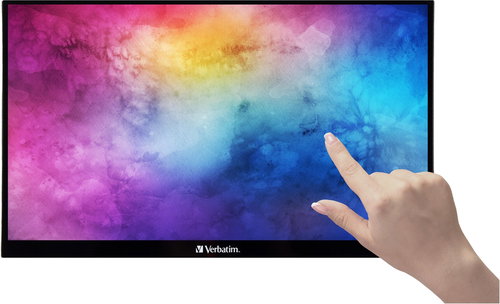


14" VERBATIM PMT-14 ALU FRAME TOUCH
The Verbatim PMT-14 Portable Display will bring a new dimension to your work, gaming and other entertainment. You can easily use it as a second screen for your laptop when you don't have access to a traditional desktop monitor. It can also be used as an additional display for your phone, tablet or other device. With its compatibility and versatility, the portable monitor will give you the ultimate flexibility for greater productivity and better entertainment on the go. The touchscreen function is not supported by iOS/iPadOS.

14"
Screen size
1920×1080 (Full HD)
Resolution (Resolution Type)
IPS Panel
Display Type
60Hz
Refresh Rate
6ms (GtG)
Response Time
Key Features of the 14" VERBATIM PMT-14 ALU FRAME TOUCH Monitor
- 14" external display with Full HD resolution
- Touch control support
- Connect via USB-C or HDMI with the need for an external power supply (included)
- An excellent, ideal solution for work/travel/gaming
- Via the USB-C or HDMI port, you can connect the portable monitor to a computer/Mac/tablet/phone/console
- Extremely thin and lightweight design with a built-in speaker
Lightweight for Easy Portability
The Verbatim PMT-14 14" portable display weighs only 990g. It also has a pleasing 6mm thin profile with a 12mm base, so it fits easily into any travel bag. You'll also have a 10-point touch screen with gesture control support. Touch control can only be used when you connect the Verbatim PMT-14 to your device via the USB-C connector. When connected via the HDMI connector, it loses its touch function.

Integrated Stand
The Verbatim PMT-14 monitor has a Full HD resolution and a 16:9 aspect ratio. The picture quality is significantly enhanced by the use of IPS technology, which provides a sharper and more accurate picture as well as wide viewing angles. The integrated fold-out stand allows you to tilt the Verbatim monitor at exactly the angle and position that suits you perfectly.

Wide Connectivity Options
The Verbatim PMT-14 portable display connects via USB-C by default, which means power, data and video are transferred through a single cable. Just plug it into your laptop, Mac, tablet, phone or console and start sharing the screen right away. In case you also need to connect via HDMI, an HDMI cable is included. However, when using the HDMI cable, it will be necessary to use the included external power supply.
- 2× USB-C
- 1× HDMI 1.4
- 1× USB-A 2.0
- 1× audio output 3.5mm audio jack

Neoprene Sleeve
Because you'll surely be carrying the Verbatim PMT-14 display often, a protective neoprene sleeve is also included. The Verbatim display will not be harmed by the vagaries of the weather, so you will have the perfect travel companion.

Device Compatibility
Laptop: with full-spec USB-C – via the included USB-C cable for both video and power for the external monitor; with HDMI via HDMI cable + powering the external monitor from the mains. Mobile phone/tablet: Apple devices with a Lightning connector – requires a Lightning to HDMI adapter + powering the external monitor from the mains; devices with a USB-C connector – MHL support is required for video transfer via USB-C and either external power or support for charging another device via the USB-C port; or a USB-C to HDMI adapter for video transfer + powering the external monitor from the mains.

Monitor Technical Specifications
- Aspect ratio: 16:9
- Maximum brightness: 250cd/m²
- Contrast ratio: 1,000:1
- Viewing angles (CR > 10): 178° horizontal and vertical
- Supports: HDR, FreeSync, Low Blue Light
- Stand: Built-in stand, tilt: from 0° to 85°
- Display colours: 16.7 million colours
- Response time (typical Tr+Tf response): 11+9ms
- Dimensions: 194×322×12mm
- Weight: 990g
- Frame material: Aluminium
- Power consumption certification: A
Package Contents
- 14" VERBATIM PMT-14 ALU FRAME TOUCH Monitor
- 1× USB-C to USB-C cable, 1m
- 1× HDMI–HDMI cable, 1.5m
- 1× USB-A to USB-C cable, 1.5m
- EU plug with UK adapter (5V, 3A)
- Neoprene protective sleeve
- Quick start guide

Colour Gamut
Determines how accurately the monitor can display colours. sRGB is ideal for the web, movies or games. DCI-P3/Adobe RGB is appreciated by graphic designers or professionals at work. The higher the value, the better the monitor displays colours. Maximum Brightness
The value, given in nits or cd/m², determines the brightness of the monitor. A brightness of over 400 nits is key for HDR content and readability in sunlight, while standard office monitors are sufficient with values above 250. Refresh Rate and Response Time
The refresh rate (Hz) determines the number of frames displayed per second, so the higher the value, the smoother the picture and the less eye strain. A lower response time (ms) value eliminates motion blur. 144Hz+ is ideal for gaming, while values around 75Hz are suitable for office monitors.Specifications
Display diagonal and resolution
Construction
Panel and screen technology
Aspect Ratio
Connection
Features and functions
Colour
Dimensions and weight
Packaging
Power outlet type
Energy specifications

IT TRADE a.s., Brtnická 1486/2, 101 00 Praha 10 - Michle, [email protected], +420 226 253 253
Specifications can be changed without notice. Images are for illustrative purposes only.
