



23.8" Dell Pro Conference (E2426HB)


23.8" Dell Pro Conference (E2426HB)
This Dell LCD monitor with a 23.8" screen size and standard Full HD (1920×1080) resolution is excellent for working with office suites, email communication, and internet browsing. In addition, it is also well-suited for occasional gaming or watching videos and films. Its IPS panel provides excellent colour reproduction and the image remains of the same quality even when you change the viewing angle. This can be used when working with documents before printing or for presentations. The anti-reflective surface of the display reduces glare and increases visibility in various lighting conditions. Thanks to the standard 16:9 aspect ratio, you can easily open two document windows side by side and work with them efficiently. The IPS panel is illuminated by LEDs. A maximum brightness of 300 cd/m² is a good choice for working out of direct sunlight and is also suitable for rooms that are not too brightly lit. It can be mounted on the wall using a 100×100 VESA mount. This is useful if you have a smaller desk or need to connect multiple monitors. This layout is popular with people involved in trading, monitoring camera systems, and similar tasks.
Key Features of the 23.8" Dell Pro Conference (E2426HB) Monitor
- Work efficiently with this 23.8" Dell LCD monitor with Full HD (1920×1080) resolution
- Uses an IPS panel with a refresh rate of up to 120Hz and a response time of 5ms for colour display
- The anti-reflective surface of the display eliminates glare and optimises visibility in all lighting conditions
- The standard 16:9 format provides you with accurate image reproduction
- The monitor features LED backlighting and 8-bit colour depth
- A maximum brightness of 300 cd/m² is suitable for working out of the sun and also for rooms that are not too brightly lit
- The FreeSync technology handles the smooth loading of the image
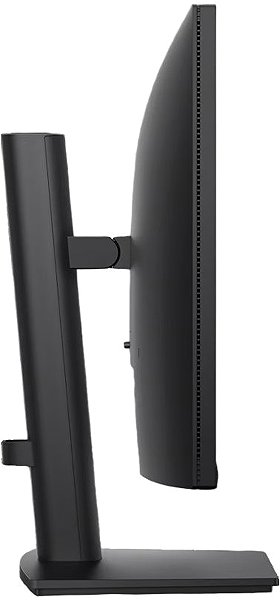
- Monitor with a flat design
The Dell Monitor will Delight You with its Interesting Properties and Functions
The 23.8" IPS PC monitor has a flat design, which will come in handy if you plan to have multiple monitors together. It is equipped with a filter that lets less harmful blue light through, which can help reduce eye fatigue and improve sleep quality. With the Daisy Chain function, you can easily connect multiple monitors to a single signal source, which makes it easy to expand your desktop without needing multiple video outputs. You can tilt and adjust the monitor to your requirements so that its top side corresponds to eye level, thus promoting correct posture, which relieves the cervical spine and acts as a preventative measure against scoliosis. The tilt option is practical for those who prefer to work while standing. The Pivot function allows for easy 90° rotation of the monitor, which is practical for traders, programmers, and data analysts using a spreadsheet editor. Vertical viewing facilitates work and reduces the need for frequent scrolling.
The Dell Monitor will Delight You with its Equipment
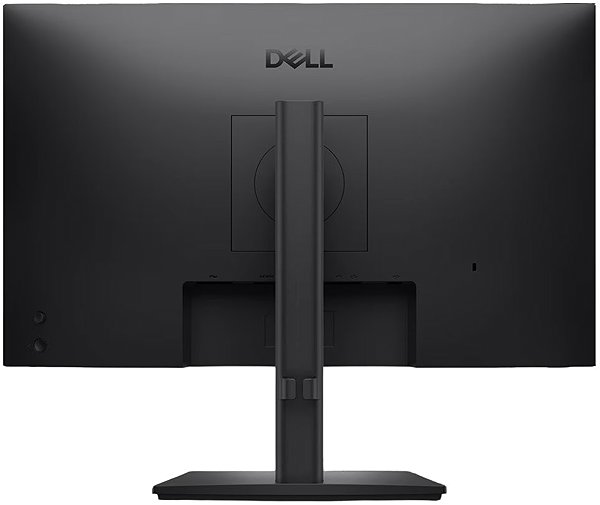
You can use HDMI and DisplayPort to connect your laptop or computer to the monitor. If your computer does not have a suitable connector, the connectivity can be expanded by purchasing a compatible port replicator. A port replicator will also be useful when you want to connect, for example, two monitors. The built-in speakers provide a convenient solution for sound and image in one device. It also includes a microphone and a webcam, which you can use for calls during meetings with your team or friends. In addition to the monitor itself, the package also includes an HDMI, DisplayPort, and USB-A cable.
Choose a Monitor Based on Colour Depth and Native Contrast
Colour depth indicates how many different colours the monitor is capable of displaying. For example, a 6-bit monitor will render almost three hundred thousand colours, while a 10-bit monitor will render more than a billion colours. A higher colour depth allows for the display of finer shades of colours and ensures a more realistic and vibrant presentation. The colour depth of the offered monitor is 8 bits. The Dell monitor has a native contrast of 1000:1. The native contrast ratio is a measure of the difference between the brightest and darkest points that the monitor can display. If a monitor has a contrast ratio of 3000:1, it means that the brightest point (white) is 3000× brighter than the darkest point (black). A higher native contrast allows for improved resolution of details in both dark and light parts of the image. A native contrast not exceeding 1000:1 will be suitable primarily for office purposes, while a ratio up to 2000:1 will be appreciated for gaming and watching films. A value above 2000:1 is characteristic of monitors for graphic designers and video editing.
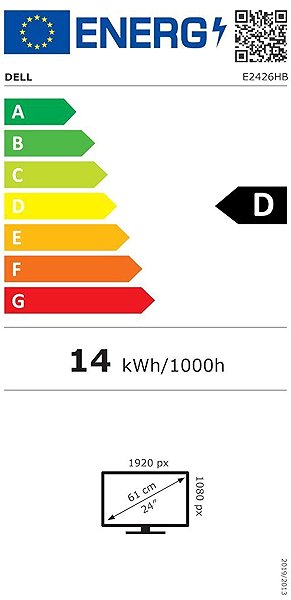
Data on the Energy Label of Monitors:
- The header indicates the manufacturer and model of the monitor
- The scale of energy classes (left), the specific energy class of the product (right)
- kWh/1000h: energy consumption in kilowatt-hours per 1000 hours of operation
- SDR kWh/1000h: energy consumption in SDR mode in kilowatt-hours per 1000 hours of operation
- Pixels: vertical and horizontal display resolution (1920×1080 px)
- Units in inches and centimetres: screen screen size
__________________________________________________________________
After scanning the QR code, you will be redirected to the European database EPREL, where you will see the display type, the technology used in its production (e.g., LCD, QLED), and other monitor specifications.

screen size:
23.8"
Colour Gamut (sRGB):
73%
Graphics Interface:
HDMI and DisplayPort
Graphics Interface Standards:
DisplayPort 1.4 and HDMI 2.1
Energy Class in SDR Mode:
D
Consumption in SDR Mode:
13.8 kWh/1000h
Stand-by Power Consumption:
0.5W
Maximum Power Consumption:
74W
Dimensions:
36.769×53.864×21.146 cm (H×W×D)
Weight:
4.95kg
Specifications
Display diagonal and resolution
Construction
Panel and screen technology
Aspect Ratio
Backlight and colour
Connection
Colour gamut
Features and functions
Colour
Dimensions and weight
Packaging
Power outlet type
Energy specifications

Dell Products, Raheen Business Park, Limerick, Ireland, [email protected], www.dell.com
This American multinational corporation based in Round Rock (Texas, USA) is a leading player in the field of information technology. The Dell brand carries the hallmark of quality and is known throughout the world. In 2010, it ranked fifth in the poll of most admired computer companies.
Dell's operations are incredibly broad - the company can be found not only in personal computers, servers, storage devices, switches, software and peripherals, but also HDTV, cameras, printers and MP3 players. The company, whose history began in 1984, now ranks among the giants in the field.
Specifications can be changed without notice. Images are for illustrative purposes only.
